LogoAI Jet
icon of Rize

Rize

Rize is an AI-powered time tracker that automates time tracking, improves focus, and helps build better work habits for increased productivity.

Introduction

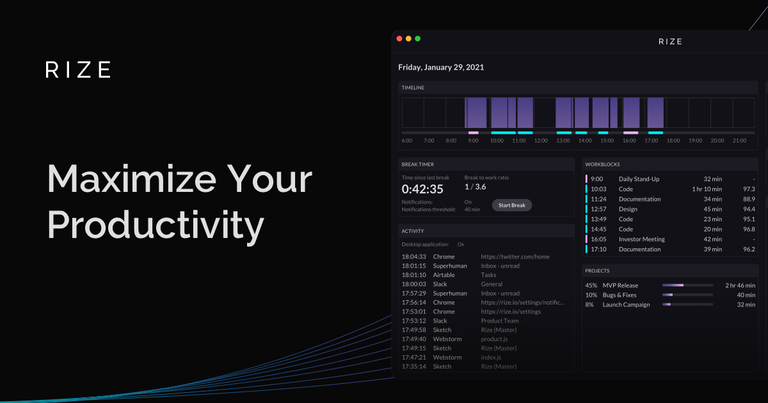
Rize is an intelligent time tracking application designed to maximize productivity by automating time tracking and providing insights into work habits. It uses AI to automatically track time spent on various tasks, clients, and projects without manual timers. Key features include:

  • Automatic Time Tracking: Captures time spent on the computer without starting or stopping timers.
  • AI-Powered Focus Detection: Identifies focus time and distractions, providing a focus score and insights into interrupting apps and websites.
  • Customizable Categories: Allows users to create custom categories for detailed time analysis.
  • Break Notifications: AI-driven notifications prompt users to take breaks based on work activity, preventing burnout.
  • Calendar Integration: Integrates with Google and Outlook Calendar for meeting categorization.
  • Distraction Blocking: Provides warnings when using distracting apps and websites.
  • Daily & Weekly Reports: Delivers time breakdown and productivity metrics via email.
  • Project Tagging: Automatically tags blocks of time with project tags.

Rize is suitable for agencies, freelancers, and individuals looking to optimize their time management, improve focus, and build better work habits. It is available on macOS and Windows.

Latest News

Blog · Product Updates

Blog · Product Updates

8/4/2026

A short explanation of the recent Rize macOS application performance issues. A new daily email, improved categorization, bug fixes and more. We released Productivity Scores to help you understand and improve the way you work. More bug fixes, especially in the macOS and Chrome auto-updaters.

What's New in Rize | Rize Documentation — Automatic Time Tracking

What's New in Rize | Rize Documentation — Automatic Time Tracking

8/4/2026

The biggest recent changes include live background tracking, a new suggestion review panel, smarter AI auto-tagging, org-level customization controls, rebuilt modals, and expanded integrations. ... Stay up to date with the latest features, improvements, and updates to Rize. Visit rize.io/changelog f...

Rize v3.0.26 Update | Rize Changelog

Rize v3.0.26 Update | Rize Changelog

8/4/2026

Rize v3.0.26 rolls up every desktop release since v3.0.15. The focus this cycle: the app should update itself reliably, recover on its own when something goes wrong, and keep your credentials safer — so you never have to think about the app, just your work.

Rize Changelog - Product Updates & New Features

Rize Changelog - Product Updates & New Features

8/4/2026

Try the latest features — start your free trial today.Start Free Trial ... Admin time entry management, timeline notes, MCP chat inside Rize and Slack, new MCP profitability and events tools, Group By in reports, Dia browser support, major database performance improvements, and a stack of bug fixes....

Rize v3.0.7 Update | Rize Changelog

Rize v3.0.7 Update | Rize Changelog

8/4/2026

Chat with your time tracking data directly inside the Rize web app — no external AI tool required. Ask about your day, your team's hours, or project profitability in plain English.

Alternatives

  • RescueTime

    Offers automatic time tracking and distraction management to help users understand and improve their digital habits.

  • Timely

    Provides AI-powered automatic time tracking and project management features, focusing on privacy and effortless logging.

  • Toggl Track

    A popular and versatile time tracking tool known for its ease of use, detailed reporting, and integration capabilities.

  • Clockify

    A free time tracker and timesheet app that allows users to track work hours across projects and analyze productivity.

  • DeskTime

    Automatically tracks computer usage, categorizes activities, and provides productivity insights to optimize work efficiency.

  • Harvest

    Simplifies time tracking, expense management, and invoicing for businesses and freelancers to manage projects profitably.

  • Hubstaff

    Combines time tracking with employee monitoring, payroll, and project management features for team productivity.

  • ClickUp

    A comprehensive productivity platform that integrates tasks, docs, goals, and time tracking into one customizable workspace.

  • Sunsama

    Helps users plan their day, manage tasks, and schedule focused work blocks to achieve daily goals and improve work-life balance.

  • Forest

    A unique app that gamifies focus by growing a virtual tree when you avoid distractions, encouraging better concentration habits.

FAQ

User Reviews

4.3/5.0
(75reviews)
Click stars to rate

Pricing

Pricing Model: Freemium

Free

Retains one day of data and deletes everything else.

$0
per month

Standard

Includes everything in the free tier plus the following:

$12.99
per month

Professional

Includes everything in the free tier plus the following:

$19.99
per month

Free

Retains one day of data and deletes everything else.

$0
per month

Standard

Includes everything in the free tier plus the following:

$16.99
per month

Professional

Includes everything in the free tier plus the following:

$29.99
per month

More Products

TinyPNG is Tinify’s browser-based image compressor and converter. This review explains how its web tool differs from its Developer API, what each free allowance covers, and when its compression, conversion, resizing, and cropping features may fit an image workflow.

Zamzar is an online file conversion and compression service for documents, images, video, sound, and other formats. Its free web service has daily file and upload-size limits.

iLoveIMG is a browser-based image service for compression, resizing, cropping, conversion, and editing, with a free Basic plan and paid options.

Smallpdf is an online PDF toolkit for conversion, compression, editing, merging, signing, and more. Its Free plan includes 30+ tools but limits downloads.

Convertio is a browser-based service for converting files between supported formats, with optional settings for many conversion types.

FreeConvert is an online file converter with more than 1,500 listed conversion types and a free allowance of 20 conversion minutes per day.

HiPDF is an online PDF service with conversion, editing, compression, merging, cropping, image tools, and AI features.

123apps is a browser-based suite of video, audio, PDF, and file-conversion tools. Its apps are free to use with limits on file size and daily operations.

ChatPDF summarizes PDFs and answers questions about them. Its free plan allows two document analyses per day, with no account needed to get started.

CloudConvert is a browser-based converter for more than 200 file formats, including documents, images, audio, video, archives, and specialist formats.

OCR.space provides free browser-based OCR for images and PDFs, searchable PDF creation, and a separate API for adding text recognition to software.

Free online itinerary maker with 900+ trip plans across 96 countries. Edit day-by-day in the browser; export to PDF, Excel, CSV, Google Sheets or .ics. Free account required to download/print. Optional Pro adds premium themes; AI chat helps draft plans.

TasteDir is a curated directory of finished, well-crafted software from indie makers and small teams. Every listed tool is reviewed by hand.

An AI meeting copilot that combines live transcripts, screenshots, and project documents to deliver contextual answers, response drafts, and meeting recaps.

Create professional invoices free in your browser: live preview, any currency, tax and discounts, custom templates, and no-watermark PDF. No signup needed.

Vidsembly is an AI video creation platform that turns PowerPoint presentations, PDFs, and documents into narrated videos. Create AI presentations, clone voices, translate slides, transcribe recordings, generate soundtracks, and host videos in one place.