

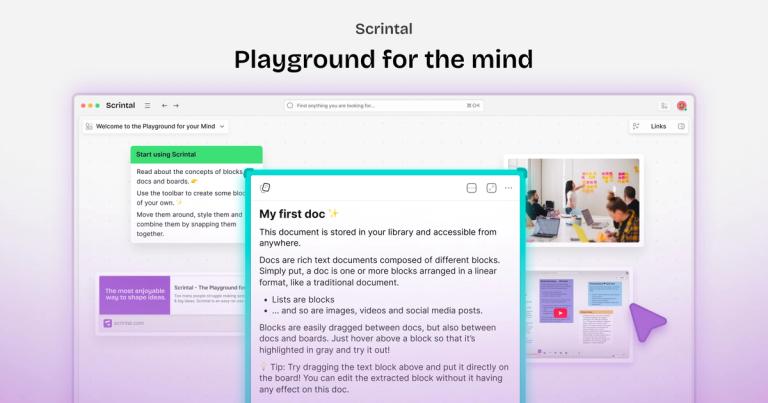
Scrintal is a visual note-taking and research tool designed to help users organize and connect ideas effectively for learning and knowledge management.
Features
- Infinite Visual Canvas — Scrintal provides a limitless digital canvas where users can freely brainstorm, organize, and visually manipulate ideas. Users can place PDFs, notes, videos, images, and nested content anywhere on the canvas, creating a spatial thinking environment that mirrors how the brain naturally connects concepts.
- Gobu AI Research Assistant — Scrintal's built-in AI assistant, Gobu, helps users deeply understand any article—from academic papers and essays to news and reports. The AI streamlines time-consuming research tasks, allowing users to focus on higher-level thinking and analysis rather than repetitive work.
- Blocks, Docs & Visual Linking System — Users can choose from a vast selection of content blocks to mix, match, and shape their learning experience. The platform supports arrows and bi-directional links to make connections and visualize relationships between ideas. Blocks can be instantly converted into full documents with a single click, transforming raw ideas into polished knowledge.
- Research & Study Templates — Scrintal offers exclusive, professionally designed templates that showcase best practices in research and the most effective study techniques. These templates help students and researchers adopt proven methodologies for learning and knowledge management from day one.
- Real-Time Collaboration — Teams can invite friends and colleagues to work together in real-time on shared canvases. This feature enables collaborative brainstorming, creative processes, and group research projects, making it ideal for academic teams and professional workgroups.
- Multi-Format Content Integration — Scrintal allows users to collect and work with PDFs, images, notes, documents, and videos all in one place. Users can read, take notes, and watch videos simultaneously on the same infinite canvas, creating a unified research workspace.
Use Cases
Academic Research & Deep Learning
Students and researchers use Scrintal to collect academic papers, take visual notes, and connect related concepts across multiple sources. The infinite canvas allows them to see the big picture of their research topic while drilling into details, making complex subjects more manageable and study more effective. Target Audience: University students, graduate researchers, PhD candidates, and lifelong learners
Team Brainstorming & Creative Ideation
Teams leverage Scrintal's collaborative canvas to brainstorm ideas, map out creative processes, and develop strategies together in real-time. The visual approach helps scattered thoughts become organized plans, enabling teams to move from initial concepts to concrete outcomes within a single tool. Target Audience: Startup teams, creative agencies, product managers, and innovation departments
Knowledge Management for Writers & Strategists
Writers, strategists, and knowledge workers use Scrintal to manage complex concepts for projects ranging from philosophy essays to speculative fiction and investment strategy. The platform helps organize research materials, connect disparate ideas, and maintain a personal knowledge base that grows over time. Target Audience: Authors, content strategists, consultants, and fund managers
Visual Note-Taking for Visual Learners
Visual learners who struggle with traditional linear note-taking find Scrintal's spatial canvas intuitive and natural. The ability to see thoughts visually, create connections with arrows, and organize ideas spatially helps them process and retain information more effectively. Target Audience: Visual learners, students with diverse learning styles, and professionals who think in diagrams
Pros
- Intuitive and natural visual interface that feels like having limitless space to brainstorm and organize ideas freely, reducing the friction between thinking and documenting.
- Powerful AI research assistant (Gobu) that accelerates understanding of complex articles and streamlines repetitive research tasks, saving significant time for users.
- Versatile content blocks with bi-directional links and arrows enable users to create meaningful connections between ideas, supporting both creative exploration and structured knowledge building.
- Real-time collaboration features make it easy for teams to work together on shared canvases, revolutionizing how groups brainstorm and develop ideas collectively.
- Comprehensive template library with research best practices and effective study techniques helps new users adopt proven methodologies immediately without a steep learning curve.
Cons
- Desktop-focused application (macOS and Windows) may limit accessibility for users who prefer mobile or web-only workflows for quick note capture on the go.
- The visual canvas approach may feel overwhelming for users who prefer simple, linear note-taking tools and don't need spatial organization for their work.
- Heavy reliance on visual organization means users with accessibility needs related to visual processing may find the interface challenging compared to text-first alternatives.
- The platform's extensive feature set (blocks, docs, arrows, links, AI, templates) may require a learning curve for users transitioning from simpler note-taking applications.


