LogoAI Jet
Icon for SheetAI

SheetAI

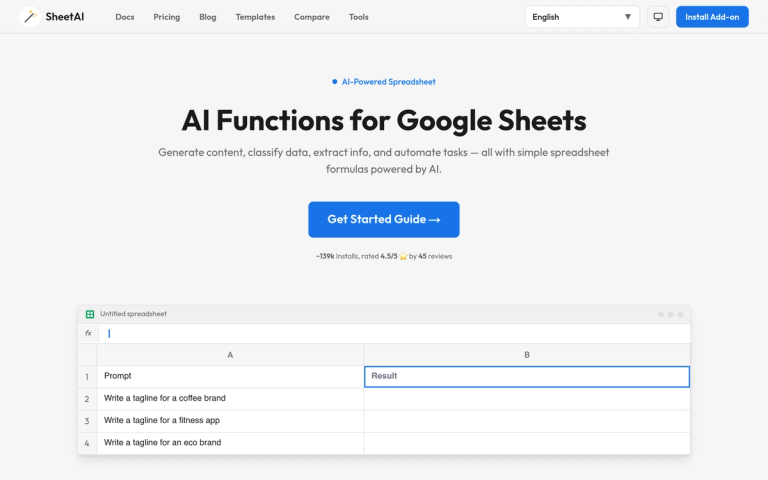
SheetAI is an AI add-on for Google Sheets that empowers users to generate content, classify data, extract information, and automate tasks using simple AI-powere

Introduction

SheetAI transforms your Google Sheets into an AI-powered spreadsheet. It brings the power of artificial intelligence directly to your Google Sheets, allowing you to generate content, analyze data, and automate complex tasks with simple functions.

With SheetAI, you can leverage AI functions to:

  • Generate content: Create product descriptions, headlines, emails, taglines, and more directly inside a cell using =SHEETAI().
  • Generate lists: Produce structured lists like blog ideas, feature bullets, or brainstorm items in seconds with =SHEETAI_LIST().
  • Extract data: Pull structured data such as names, numbers, or entities from any unstructured text using =SHEETAI_EXTRACT().
  • Classify & Categorize: Automatically sort text into categories like sentiment, topics, or custom labels with =SHEETAI_CLASSIFY().
  • Smart Auto-Fill: Auto-complete columns with AI-generated data such as capitals, currencies, or categories using =SHEETAI_FILL().
  • Summarize Long Text: Condense lengthy documents, reports, or articles into concise summaries with =SHEETAI_SUMMARIZE().

SheetAI boasts ~139k installs and is rated 4.5/5 ⭐️ by 45 reviews, making it a trusted tool for enhancing spreadsheet productivity.

Target Audience

Professionals across every function, including marketing, HR, data analysts, and anyone working with data in Google Sheets.

Key Features
  • AI Functions for Google Sheets (e.g., =SHEETAI())
  • Generate any text content (product descriptions, headlines, emails)
  • Generate structured lists (blog ideas, feature bullets)
  • Extract structured data from text (names, numbers, entities)
  • Classify and categorize data (sentiment, topics, custom labels)
  • Smart auto-fill for columns (capitals, currencies, categories)
  • Summarize long text (documents, reports, articles)
Use Cases
  • Marketing: Generate ad copy, taglines, campaign ideas, social posts.
  • Data Management: Classify, tag, and clean messy datasets without code.
  • Content Creation: Brainstorm blog topics, titles, and outlines; generate video ideas.
  • Research: Summarize papers, extract key findings, organize sources.
  • Sales: Draft follow-up emails, personalize outreach, track leads.
  • HR: Generate job descriptions, screen resumes, draft outreach.
Pros
  • Revolutionizes how users work with data in Google Sheets
  • Incredibly intuitive AI functions
  • Saves hours of manual work every week
  • Enables generation of content, analysis of trends, and creation of reports with simple formulas
Pricing

Not explicitly mentioned on the provided webpage content.

FAQ

User Reviews

Click stars to rate

Pricing

Pricing Model: Freemium

Free

Free tier with limited usage

Free
monthly

Unlimited Monthly

Unlimited access on a monthly subscription

$20/month
monthly

Unlimited Yearly

Unlimited access on an annual subscription

$200/year
yearly

Domain License

Team plan for up to 20 users on one domain

$299/year
yearly

More Products

TinyPNG is Tinify’s browser-based image compressor and converter. This review explains how its web tool differs from its Developer API, what each free allowance covers, and when its compression, conversion, resizing, and cropping features may fit an image workflow.

Zamzar is an online file conversion and compression service for documents, images, video, sound, and other formats. Its free web service has daily file and upload-size limits.

iLoveIMG is a browser-based image service for compression, resizing, cropping, conversion, and editing, with a free Basic plan and paid options.

Smallpdf is an online PDF toolkit for conversion, compression, editing, merging, signing, and more. Its Free plan includes 30+ tools but limits downloads.

Convertio is a browser-based service for converting files between supported formats, with optional settings for many conversion types.

FreeConvert is an online file converter with more than 1,500 listed conversion types and a free allowance of 20 conversion minutes per day.

HiPDF is an online PDF service with conversion, editing, compression, merging, cropping, image tools, and AI features.

123apps is a browser-based suite of video, audio, PDF, and file-conversion tools. Its apps are free to use with limits on file size and daily operations.

ChatPDF summarizes PDFs and answers questions about them. Its free plan allows two document analyses per day, with no account needed to get started.

CloudConvert is a browser-based converter for more than 200 file formats, including documents, images, audio, video, archives, and specialist formats.

OCR.space provides free browser-based OCR for images and PDFs, searchable PDF creation, and a separate API for adding text recognition to software.

Free online itinerary maker with 900+ trip plans across 96 countries. Edit day-by-day in the browser; export to PDF, Excel, CSV, Google Sheets or .ics. Free account required to download/print. Optional Pro adds premium themes; AI chat helps draft plans.

TasteDir is a curated directory of finished, well-crafted software from indie makers and small teams. Every listed tool is reviewed by hand.

An AI meeting copilot that combines live transcripts, screenshots, and project documents to deliver contextual answers, response drafts, and meeting recaps.

Create professional invoices free in your browser: live preview, any currency, tax and discounts, custom templates, and no-watermark PDF. No signup needed.

Options research platform with live data. Scan for puts and calls, compare strikes in a yield matrix, model strategies, and journal every trade.