LogoAI Jet
Icon for Sigma

Sigma

A privacy-focused AI browser with built-in AI chat, AI agent, image generation, and local LLM processing for complete data privacy.

Introduction

Sigma Private AI Browser

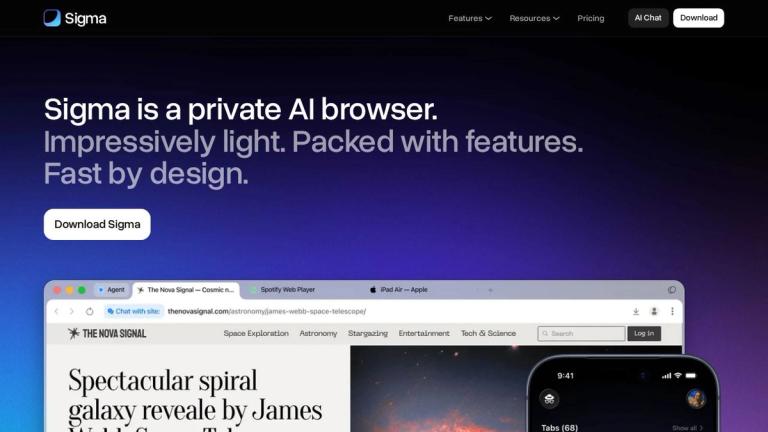
Sigma is a privacy-focused web browser that integrates advanced AI capabilities directly into the browsing experience. Designed with the philosophy "Your AI. Your Device. Your Rules," Sigma combines powerful AI features with robust privacy protections.

Key Highlights
  • Eclipse Local AI: Sigma runs a local LLM (Large Language Model) called Eclipse directly in the browser, ensuring your data stays on your device with no cloud processing required
  • AI Agent: Automates tasks on your behalf — navigating pages, filling forms, and managing workflows end-to-end
  • AI Chat: Integrated chat interface for questions, deep research, image generation, and content creation
  • Privacy-First Design: Critical data stays local, with built-in ad blocking and blockchain-based mnemonic profiles for secure identity management
Platform Support

Available for both macOS and Windows operating systems, Sigma delivers a fast, lightweight browsing experience packed with AI-powered features while maintaining user privacy as the top priority.

Target Audience

Privacy-conscious users who want AI-powered browsing capabilities, researchers, professionals who need AI assistance while maintaining data security

Key Features
  • AI Agent for automated task completion
  • Eclipse local LLM for offline AI processing
  • AI Chat with deep research capabilities
  • AI Image Generator
  • Chat With Page feature
  • Built-in ad blocker
  • Mnemonic profile with blockchain cryptography
  • Uncensored AI capabilities
  • Privacy-focused browsing with local data processing
Use Cases
  • Private web browsing with AI assistance
  • Automated web tasks and form filling
  • Deep research and information gathering
  • AI-powered image generation
  • Secure browsing with ad blocking
  • Offline AI processing for sensitive data
  • Content creation and text generation
Pros
  • Strong privacy focus with local AI processing
  • Comprehensive AI features built into browser
  • No cloud dependency for sensitive data
  • Built-in ad blocker
  • Available on both macOS and Windows
  • Blockchain-based secure identity system
Cons
  • Newer browser with potentially smaller extension ecosystem
  • Local AI processing may require more device resources
  • May have learning curve for AI features
Pricing

Free download available; premium plans likely offered (referenced on pricing page)

Latest News

Blog | Sigma AI Browser

Blog | Sigma AI Browser

8/4/2026

Sigma Browser logo AI Chat # Sigma Browser Blog Stay informed with the latest news, updates and industry trends Blog Images July 20, 2026 Browser With On-Device AI: Best Local AI Browsers in 2026 A guide to on-device AI browsers, local models, privacy, offline use, and Sigma’s place in the category....

Product Updates | Sigma AI Browser

Product Updates | Sigma AI Browser

8/4/2026

Updated Chromium Engine (Windows & Mac) A safer, smoother browsing experience with the latest Chromium version — improved stability and security under the hood. Smarter Agent Framework (Windows & Mac) The agent is now faster and more intelligent, capable of handling complex tasks with better context...

Releases | Sigma AI Browser

Releases | Sigma AI Browser

8/4/2026

Sigma Browser logo AI Chat Download # Press Releases Blog Images January 6, 2026 Sigma Launches the First Private AI Browser With Cloudless LLM Sigma Browser has announced the launch of Sigma Eclipse, the world’s first AI-powered browser built on a fully local, cloudless large language model archite...

How to Summarize and Compare Multiple Web Pages With AI

How to Summarize and Compare Multiple Web Pages With AI

8/4/2026

We’ll let you know when Sigma for Android launches. You’re on the list! Please enter a valid email address. Sigma Browser #### About SupportPricing #### Features Deep ResearchUncensored AIAI AgentImage GeneratorChat with pagePrivate AIAI ChatPrivate Browser #### Resources BlogUpdatesPress releases #...

Sigma AI Chat – Ask, Write, and Create with One Tool

Sigma AI Chat – Ask, Write, and Create with One Tool

8/4/2026

Where can I learn more or suggest features? × ## Get Sigma on Android We’ll let you know when Sigma for Android launches. You’re on the list! Please enter a valid email address. Sigma Browser #### About SupportPricing #### Features Deep ResearchUncensored AIAI AgentImage GeneratorChat with pagePriva...

FAQ

More Products

TinyPNG is Tinify’s browser-based image compressor and converter. This review explains how its web tool differs from its Developer API, what each free allowance covers, and when its compression, conversion, resizing, and cropping features may fit an image workflow.

Zamzar is an online file conversion and compression service for documents, images, video, sound, and other formats. Its free web service has daily file and upload-size limits.

iLoveIMG is a browser-based image service for compression, resizing, cropping, conversion, and editing, with a free Basic plan and paid options.

Smallpdf is an online PDF toolkit for conversion, compression, editing, merging, signing, and more. Its Free plan includes 30+ tools but limits downloads.

Convertio is a browser-based service for converting files between supported formats, with optional settings for many conversion types.

FreeConvert is an online file converter with more than 1,500 listed conversion types and a free allowance of 20 conversion minutes per day.

HiPDF is an online PDF service with conversion, editing, compression, merging, cropping, image tools, and AI features.

123apps is a browser-based suite of video, audio, PDF, and file-conversion tools. Its apps are free to use with limits on file size and daily operations.

ChatPDF summarizes PDFs and answers questions about them. Its free plan allows two document analyses per day, with no account needed to get started.

CloudConvert is a browser-based converter for more than 200 file formats, including documents, images, audio, video, archives, and specialist formats.

OCR.space provides free browser-based OCR for images and PDFs, searchable PDF creation, and a separate API for adding text recognition to software.

Free online itinerary maker with 900+ trip plans across 96 countries. Edit day-by-day in the browser; export to PDF, Excel, CSV, Google Sheets or .ics. Free account required to download/print. Optional Pro adds premium themes; AI chat helps draft plans.

TasteDir is a curated directory of finished, well-crafted software from indie makers and small teams. Every listed tool is reviewed by hand.

An AI meeting copilot that combines live transcripts, screenshots, and project documents to deliver contextual answers, response drafts, and meeting recaps.

Create professional invoices free in your browser: live preview, any currency, tax and discounts, custom templates, and no-watermark PDF. No signup needed.

Free online auto redaction tool with AI for PDFs, images, Word, PowerPoint, Excel, text and audio. Files are never stored.