LogoAI Jet
Icon for Skribr

Skribr

Skribr is an on-device AI chat app for iPhone, iPad, and Mac that runs offline, keeping all data secure and private on your device.

Introduction

Introducing Skribr

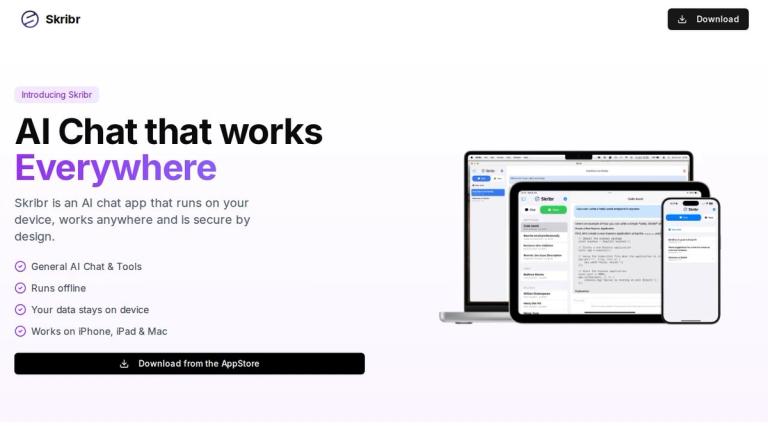
Skribr is an AI chat application designed to bring the power of artificial intelligence directly to your Apple devices. Unlike cloud-based AI solutions, Skribr runs entirely on your device, ensuring complete privacy and the ability to use AI anywhere — even without an internet connection.

Key Highlights
  • Works Everywhere: Use AI chat and tools on your iPhone, iPad, and Mac without needing an internet connection
  • Secure by Design: All messages and data are processed on-device, meaning they never leave your device
  • Multiple AI Models: Choose from three model sizes (Small, Medium, Large) to match your device's capabilities and your accuracy needs
  • Simple Setup: Download the app, choose your model, and start using AI immediately
Model Options
ModelStorageRAMBest For
Small2GB2GBDevices with limited memory
Medium5GB5GBMost modern devices
Large10GB12GBM4 iPad Pro (1TB+) and Macs

All models require iOS 18.5, iPadOS 18.5, or macOS 15 or later.

Target Audience

Apple device users who value privacy and need AI assistance on-the-go, including creative professionals, students, and anyone seeking offline AI capabilities

Key Features
  • On-device AI processing - no internet required
  • Works on iPhone, iPad, and Mac
  • Complete data privacy - nothing leaves your device
  • Multiple AI model sizes for different device capabilities
  • AI chat and creative tools included
  • Simple setup wizard for easy onboarding
  • Available on the App Store
Use Cases
  • General AI-powered conversations and Q&A
  • Creative writing and brainstorming assistance
  • Offline AI usage when traveling or in areas without connectivity
  • Privacy-sensitive AI interactions
  • Quick AI-powered tasks on mobile devices
Pros
  • Complete privacy with on-device processing
  • Works offline without internet connection
  • Available across Apple ecosystem (iPhone, iPad, Mac)
  • Multiple model sizes to fit different devices
  • Simple and easy to use
Cons
  • Requires iOS 18.5/iPadOS 18.5/macOS 15 or later
  • Larger models require significant storage and RAM
  • Small model is more prone to hallucinations
  • Apple ecosystem only - no Android or Windows support
Pricing

Available on the App Store (pricing not specified on website)

FAQ

More Products

TinyPNG is Tinify’s browser-based image compressor and converter. This review explains how its web tool differs from its Developer API, what each free allowance covers, and when its compression, conversion, resizing, and cropping features may fit an image workflow.

Zamzar is an online file conversion and compression service for documents, images, video, sound, and other formats. Its free web service has daily file and upload-size limits.

iLoveIMG is a browser-based image service for compression, resizing, cropping, conversion, and editing, with a free Basic plan and paid options.

Smallpdf is an online PDF toolkit for conversion, compression, editing, merging, signing, and more. Its Free plan includes 30+ tools but limits downloads.

Convertio is a browser-based service for converting files between supported formats, with optional settings for many conversion types.

FreeConvert is an online file converter with more than 1,500 listed conversion types and a free allowance of 20 conversion minutes per day.

HiPDF is an online PDF service with conversion, editing, compression, merging, cropping, image tools, and AI features.

123apps is a browser-based suite of video, audio, PDF, and file-conversion tools. Its apps are free to use with limits on file size and daily operations.

ChatPDF summarizes PDFs and answers questions about them. Its free plan allows two document analyses per day, with no account needed to get started.

CloudConvert is a browser-based converter for more than 200 file formats, including documents, images, audio, video, archives, and specialist formats.

OCR.space provides free browser-based OCR for images and PDFs, searchable PDF creation, and a separate API for adding text recognition to software.

Free online itinerary maker with 900+ trip plans across 96 countries. Edit day-by-day in the browser; export to PDF, Excel, CSV, Google Sheets or .ics. Free account required to download/print. Optional Pro adds premium themes; AI chat helps draft plans.

TasteDir is a curated directory of finished, well-crafted software from indie makers and small teams. Every listed tool is reviewed by hand.

An AI meeting copilot that combines live transcripts, screenshots, and project documents to deliver contextual answers, response drafts, and meeting recaps.

Create professional invoices free in your browser: live preview, any currency, tax and discounts, custom templates, and no-watermark PDF. No signup needed.

Free online auto redaction tool with AI for PDFs, images, Word, PowerPoint, Excel, text and audio. Files are never stored.