LogoAI Jet
Icon for Smart Keys

Smart Keys

AI-powered keyboard for iPhone, iPad, and Mac that fixes grammar, translates text, and enhances writing with one tap.

Introduction

Smart Keys - AI Keyboard

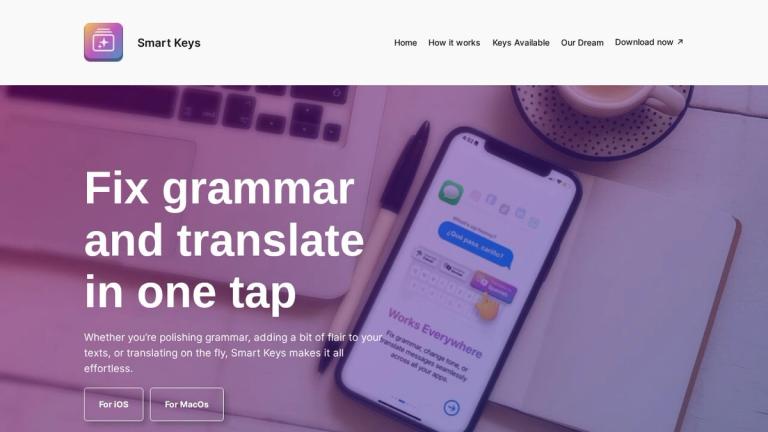
Smart Keys is an AI-powered keyboard application designed for Apple devices (iPhone, iPad, and Mac) that streamlines the writing process. Whether you're polishing grammar, adding flair to your texts, or translating on the fly, Smart Keys makes it all effortless with just one tap.

How It Works
On iPhone or iPad
  1. Install Smart Keys on your device to get the full power of a smart keyboard at your fingertips
  2. Find your favorite keys - Discover and select keys that suit your needs for work, play, or translation
  3. Use them anywhere - Seamlessly integrate Smart Keys into your keyboard for consistent typing across all apps
On Mac
  1. Install Smart Keys to access AI shortcuts at your fingertips
  2. Find your favorite keys - Select keys tailored to your specific tasks
  3. Use them anywhere - Integrate Smart Keys into your workflow across all applications
Latest Features

Smart Keys offers specialized functions including:

  • Remove Comments - Clean up code by stripping unnecessary comments
  • Add Comments - Enhance code clarity with meaningful comments
  • Summarize - Condense text with precision and clarity
  • Optimize Code - Make code sleek and efficient
  • Solve TODOs - Turn placeholders into solutions
  • Explain Code - Break down code into simple explanations
Vision

Smart Keys envisions a world where communication flows freely—where words have the power to heal, connect, and inspire. The company is dedicated to breaking the walls that divide us, whether they exist in misunderstandings, cultural divides, or language limits.

Target Audience

Writers, developers, professionals, students, and anyone who wants to improve their writing or coding efficiency on Apple devices

Key Features
  • One-tap grammar fixing
  • Real-time translation
  • Text enhancement and flair
  • Cross-app integration
  • Code comment management (add/remove)
  • Text summarization
  • Code optimization
  • TODO solving
  • Code explanation
  • Works on iPhone, iPad, and Mac
Use Cases
  • Polishing grammar in emails and messages
  • Translating text on the fly
  • Adding stylistic flair to writing
  • Cleaning up code by removing unnecessary comments
  • Adding meaningful comments to code
  • Summarizing long texts quickly
  • Optimizing code for better performance
  • Resolving TODO items in codebases
  • Explaining complex code in simple terms
Pros
  • Seamless integration across all apps
  • Works on multiple Apple devices (iPhone, iPad, Mac)
  • One-tap functionality for quick actions
  • Versatile use for both writing and coding tasks
  • AI-powered for intelligent suggestions
Cons
  • Limited to Apple ecosystem (iOS, iPadOS, macOS)
  • May require subscription for full features
Pricing

Not explicitly stated on the webpage

Latest News

Get updates

Get updates

8/4/2026

Notice: Function _load_textdomain_just_in_time was called incorrectly. Translation loading for the`wordfence` domain was triggered too early. This is usually an indicator for some code in the plugin or theme running too early. Translations should be loaded at the`init` action or later. Please see De...

Create Your Own AI Key - Smart Keys

Create Your Own AI Key - Smart Keys

8/4/2026

Create Your Own AI Key - Smart Keys # Create Your Own AI Key Smart Keys lets you build your own Generative AI tool in seconds. No coding. No setup. Just type what you want your new key to do. For example: - “Turn this list into a catchy tweet” - “Translate to French like a someone from Paris” - ...

Smart Keys

Smart Keys

8/4/2026

Notice: Function _load_textdomain_just_in_time was called incorrectly. Translation loading for the`wordfence` domain was triggered too early. This is usually an indicator for some code in the plugin or theme running too early. Translations should be loaded at the`init` action or later. Please see De...

Smart Keys for MacOS

Smart Keys for MacOS

8/4/2026

Notice: Function _load_textdomain_just_in_time was called incorrectly. Translation loading for the`wordfence` domain was triggered too early. This is usually an indicator for some code in the plugin or theme running too early. Translations should be loaded at the`init` action or later. Please see De...

Smart Keys Store

Smart Keys Store

8/4/2026

Notice: Function _load_textdomain_just_in_time was called incorrectly. Translation loading for the`wordfence` domain was triggered too early. This is usually an indicator for some code in the plugin or theme running too early. Translations should be loaded at the`init` action or later. Please see De...

FAQ

More Products

TinyPNG is Tinify’s browser-based image compressor and converter. This review explains how its web tool differs from its Developer API, what each free allowance covers, and when its compression, conversion, resizing, and cropping features may fit an image workflow.

Zamzar is an online file conversion and compression service for documents, images, video, sound, and other formats. Its free web service has daily file and upload-size limits.

iLoveIMG is a browser-based image service for compression, resizing, cropping, conversion, and editing, with a free Basic plan and paid options.

Smallpdf is an online PDF toolkit for conversion, compression, editing, merging, signing, and more. Its Free plan includes 30+ tools but limits downloads.

Convertio is a browser-based service for converting files between supported formats, with optional settings for many conversion types.

FreeConvert is an online file converter with more than 1,500 listed conversion types and a free allowance of 20 conversion minutes per day.

HiPDF is an online PDF service with conversion, editing, compression, merging, cropping, image tools, and AI features.

123apps is a browser-based suite of video, audio, PDF, and file-conversion tools. Its apps are free to use with limits on file size and daily operations.

ChatPDF summarizes PDFs and answers questions about them. Its free plan allows two document analyses per day, with no account needed to get started.

CloudConvert is a browser-based converter for more than 200 file formats, including documents, images, audio, video, archives, and specialist formats.

OCR.space provides free browser-based OCR for images and PDFs, searchable PDF creation, and a separate API for adding text recognition to software.

Free online itinerary maker with 900+ trip plans across 96 countries. Edit day-by-day in the browser; export to PDF, Excel, CSV, Google Sheets or .ics. Free account required to download/print. Optional Pro adds premium themes; AI chat helps draft plans.

AI manga translator that re-letters your language into the art

TasteDir is a curated directory of finished, well-crafted software from indie makers and small teams. Every listed tool is reviewed by hand.

An AI meeting copilot that combines live transcripts, screenshots, and project documents to deliver contextual answers, response drafts, and meeting recaps.

Create professional invoices free in your browser: live preview, any currency, tax and discounts, custom templates, and no-watermark PDF. No signup needed.