LogoAI Jet
Icon for SmartDraw

SmartDraw

Professional diagramming software for creating floor plans, flowcharts, org charts, and scaled drawings with enterprise-grade features and industry-standard sym

Introduction

SmartDraw

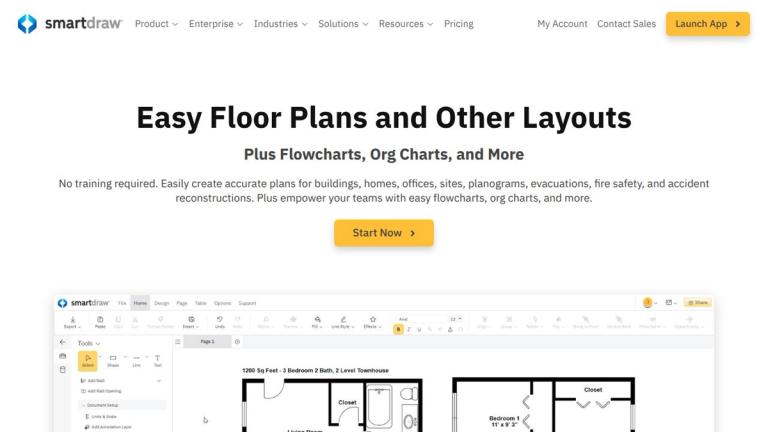
SmartDraw is a comprehensive diagramming and visual planning platform designed to help teams create accurate scaled drawings, floor plans, flowcharts, organizational charts, and more. Unlike traditional CAD software, SmartDraw makes it easy for anyone to produce professional-quality diagrams without extensive training.

Key Highlights
  • Intuitive Interface: Create scaled drawings from scratch or start with imported PDFs and Google Maps
  • Industry-Standard Content: Access thousands of professional symbols for commercial, residential, and technical applications
  • Enterprise Ready: Seamless integration with existing IT infrastructure including SSO provisioning and preferred storage solutions
  • Trusted by Leaders: Used by over 85% of Fortune 500 companies including Amazon, Intel, Oracle, and Pfizer

SmartDraw empowers entire organizations to visualize spaces, plans, and processes across every industry—from warehouse layouts and office designs to accident reconstructions and fire safety plans.

Target Audience

Enterprise teams, architects, facility managers, safety professionals, business analysts, and organizations requiring professional diagramming capabilities

Key Features
  • Scaled floor plan creation without CAD complexity
  • Thousands of industry-standard symbols
  • PDF and Google Map import capabilities
  • Flowcharts, org charts, mind maps, and project charts
  • SSO provisioning and enterprise security
  • Integration with Microsoft and Google ecosystems
  • Dedicated enterprise support and onboarding
  • Team collaboration on diagrams and plans
Use Cases
  • Commercial floor plans for facilities, warehouses, and restaurants
  • Residential floor plan design
  • Office layout planning and space optimization
  • Landscape design for residential and commercial properties
  • Accident reconstruction documentation for legal proceedings
  • Fire safety and evacuation plan creation
  • Planogram and store layout design
  • Process documentation with flowcharts
  • Organizational structure visualization
Pros
  • Easy to use without CAD training required
  • Precise enough for expert-level scaled drawings
  • Comprehensive library of industry-standard symbols
  • Seamless enterprise IT integration
  • Trusted by Fortune 500 companies
  • Supports multiple diagram types in one platform
Cons
  • May lack advanced CAD features for specialized engineering
  • Enterprise features may require paid subscription
Pricing

Free trial available; enterprise pricing with dedicated support

FAQ

More Products

TinyPNG is Tinify’s browser-based image compressor and converter. This review explains how its web tool differs from its Developer API, what each free allowance covers, and when its compression, conversion, resizing, and cropping features may fit an image workflow.

Zamzar is an online file conversion and compression service for documents, images, video, sound, and other formats. Its free web service has daily file and upload-size limits.

iLoveIMG is a browser-based image service for compression, resizing, cropping, conversion, and editing, with a free Basic plan and paid options.

Smallpdf is an online PDF toolkit for conversion, compression, editing, merging, signing, and more. Its Free plan includes 30+ tools but limits downloads.

Convertio is a browser-based service for converting files between supported formats, with optional settings for many conversion types.

FreeConvert is an online file converter with more than 1,500 listed conversion types and a free allowance of 20 conversion minutes per day.

HiPDF is an online PDF service with conversion, editing, compression, merging, cropping, image tools, and AI features.

123apps is a browser-based suite of video, audio, PDF, and file-conversion tools. Its apps are free to use with limits on file size and daily operations.

ChatPDF summarizes PDFs and answers questions about them. Its free plan allows two document analyses per day, with no account needed to get started.

CloudConvert is a browser-based converter for more than 200 file formats, including documents, images, audio, video, archives, and specialist formats.

OCR.space provides free browser-based OCR for images and PDFs, searchable PDF creation, and a separate API for adding text recognition to software.

Free online itinerary maker with 900+ trip plans across 96 countries. Edit day-by-day in the browser; export to PDF, Excel, CSV, Google Sheets or .ics. Free account required to download/print. Optional Pro adds premium themes; AI chat helps draft plans.

TasteDir is a curated directory of finished, well-crafted software from indie makers and small teams. Every listed tool is reviewed by hand.

An AI meeting copilot that combines live transcripts, screenshots, and project documents to deliver contextual answers, response drafts, and meeting recaps.

SpriteGen is a free online sprite creator. Describe your character, pick a perspective and style, and the AI generates a game-ready pixel-art sprite sheet.

Create professional invoices free in your browser: live preview, any currency, tax and discounts, custom templates, and no-watermark PDF. No signup needed.