LogoAI Jet
Icon for XXAI

XXAI

An all-in-one AI desktop app that unifies text, image, and video creation tools into a single platform, acting as an AI copilot across all applications and webs

Introduction

XXAI: The All-in-One AI App for Writing, Image & Video Creation

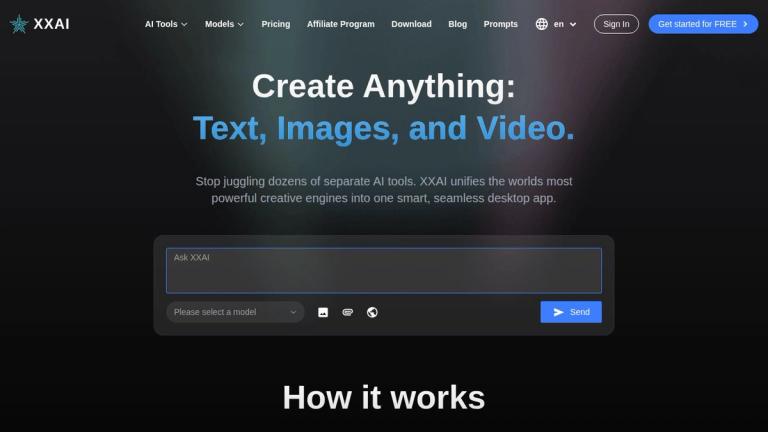
XXAI is a comprehensive AI-powered desktop application available for both Mac and Windows that brings together the world's most powerful creative AI engines into one unified command center. Rather than juggling multiple separate AI subscriptions for writing, image generation, and video creation, XXAI consolidates everything into a single, seamless experience.

Core Concept

XXAI positions itself as the "only AI subscription you'll ever need" by integrating top-tier AI models for text, image, and video creation. The platform acts as an AI copilot that works directly within all your existing applications, documents, and websites — eliminating the need to switch between different tools.

Key Capabilities
AI Writing Suite

Enhance your writing anywhere with tools for writing, rewriting, and analysis. Transform ideas into polished drafts with intelligent assistance.

AI Image Generation

Create stunning visuals, logos, and artwork from simple text descriptions, powered by world-class AI models.

AI Video Generation

Generate engaging videos from images or text prompts, bringing stories to life with AI-powered video creation.

AI Search Assistant

Get real-time, synthesized answers from the web without searching multiple sites.

AI Copilot

Works perfectly within all your docs, apps, and websites. Access top AI models right where you need them with simple keyboard shortcuts (e.g., Shift + A to activate).

Prompt Library

Access a vast library of expert-crafted prompts for any task, or create and save your own for instant reuse.

How It Works
  1. Install XXAI for Free - Download the desktop application
  2. Create Your Account - Sign up to get started
  3. Boost Productivity - Use keyboard shortcuts to activate AI anywhere
Privacy & Data

XXAI emphasizes user privacy — you own all content created, and the platform does not use your data to train any AI models.

Target Audience

Writers, designers, marketers, developers, content creators, and anyone who needs AI-powered creative tools across multiple domains

Key Features
  • AI Writing Suite for writing, rewriting, and analysis
  • AI Image Generation from text descriptions
  • AI Video Generation from images or text prompts
  • AI Search Assistant for real-time web answers
  • AI Copilot that works across all apps and websites
  • Prompt Library with expert-crafted prompts
  • Keyboard shortcuts for instant AI activation
  • Unified credits system across all tools
  • No need for separate AI accounts or API keys
  • Privacy-focused with no data used for training
Use Cases
  • Content creation for writers and bloggers
  • Visual design and image generation for designers
  • Video content creation for marketers
  • Research and information synthesis
  • Document editing and proofreading
  • Social media content production
  • Marketing copy and campaign creation
  • Developer assistance across coding environments
  • Academic writing and research
  • Business presentation and report creation
Pros
  • All-in-one solution replacing multiple AI subscriptions
  • Works across all desktop applications and websites
  • Free plan available with 100 daily credits
  • No need for separate AI accounts or API keys
  • Privacy-focused - doesn't use data for AI training
  • Simple keyboard shortcuts for quick activation
  • Significantly cheaper than separate AI tool subscriptions
  • Unified interface for text, image, and video creation
Cons
  • Desktop only - no mobile or web-only version
  • Some premium features require paid plans
  • Credit-based system may limit heavy free users
  • Requires installation on local machine
Pricing

Free plan with 100 universal daily credits; Paid plans starting at $9.9/month (billed annually) with access to all text, image, and video tools

Latest News

XXAI's New Pricing: About our first price change and plan updates

XXAI's New Pricing: About our first price change and plan updates

8/5/2026

​Flexibility​: Choose the plan that fits your usage—whether you're just starting out or you're a power user. ​Security​: Trust in our commitment to keeping your data safe and secure. We are constantly adding more features and value to all levels of XXAI plans, including our Free plan. As your needs ...

More Than Just a Tool: Is Grok’s AI Girl Ani Making Users Fall ...

More Than Just a Tool: Is Grok’s AI Girl Ani Making Users Fall ...

8/5/2026

XXAI’s latest update includes powerful integrations for both image and video generation: ... In addition, you can seamlessly switch between top-tier models like GPT-4o, Claude 3.5, Gemini, LLaMA, and more—all on a single subscription, starting at just ​\$9.9/month​. Whether you’re designing your own...

XXAI - Blog: AI Insights, Tips, and News

XXAI - Blog: AI Insights, Tips, and News

8/5/2026

The Ultimate Experience on XXAI · Claude Haiku 4.5: Features, Testing Results, and Real-World Use Cases · Gemini 3 Pro Prompt Library: Elevate Your AI Skills with These Expert‑Crafted Prompts · Body Language and Microexpressions: Unveiling the Truth About "Microexpressions" Gemini 3 Pro Free Access:...

How to Seamlessly Connect XXAI to Your Daily Apps and Websites

How to Seamlessly Connect XXAI to Your Daily Apps and Websites

8/5/2026

Ask specific questions about XXAI’s features, such as the AI Writing Assistant or AI Copilot. Analyze Feedback Trends Look for patterns in user feedback. If multiple users mention similar issues, prioritize addressing those areas. For instance, if users find the AI Writing Assistant’s suggestions to...

PixVerse 3.5: Fast AI Video Generation and Viral Effect Templates

PixVerse 3.5: Fast AI Video Generation and Viral Effect Templates

8/5/2026

Special effects like “New Year greetings” or “cyber dragon slaying” could tap into the festive mood, particularly in markets like China, and drive even more engagement. As PixVerse continues to make waves in the AI space, it’s also important to highlight another remarkable tool that is gaining atten...

FAQ

More Products

TinyPNG is Tinify’s browser-based image compressor and converter. This review explains how its web tool differs from its Developer API, what each free allowance covers, and when its compression, conversion, resizing, and cropping features may fit an image workflow.

Zamzar is an online file conversion and compression service for documents, images, video, sound, and other formats. Its free web service has daily file and upload-size limits.

iLoveIMG is a browser-based image service for compression, resizing, cropping, conversion, and editing, with a free Basic plan and paid options.

Smallpdf is an online PDF toolkit for conversion, compression, editing, merging, signing, and more. Its Free plan includes 30+ tools but limits downloads.

Convertio is a browser-based service for converting files between supported formats, with optional settings for many conversion types.

FreeConvert is an online file converter with more than 1,500 listed conversion types and a free allowance of 20 conversion minutes per day.

HiPDF is an online PDF service with conversion, editing, compression, merging, cropping, image tools, and AI features.

123apps is a browser-based suite of video, audio, PDF, and file-conversion tools. Its apps are free to use with limits on file size and daily operations.

ChatPDF summarizes PDFs and answers questions about them. Its free plan allows two document analyses per day, with no account needed to get started.

CloudConvert is a browser-based converter for more than 200 file formats, including documents, images, audio, video, archives, and specialist formats.

OCR.space provides free browser-based OCR for images and PDFs, searchable PDF creation, and a separate API for adding text recognition to software.

Free online itinerary maker with 900+ trip plans across 96 countries. Edit day-by-day in the browser; export to PDF, Excel, CSV, Google Sheets or .ics. Free account required to download/print. Optional Pro adds premium themes; AI chat helps draft plans.

TasteDir is a curated directory of finished, well-crafted software from indie makers and small teams. Every listed tool is reviewed by hand.

An AI meeting copilot that combines live transcripts, screenshots, and project documents to deliver contextual answers, response drafts, and meeting recaps.

Create professional invoices free in your browser: live preview, any currency, tax and discounts, custom templates, and no-watermark PDF. No signup needed.

Vidsembly is an AI video creation platform that turns PowerPoint presentations, PDFs, and documents into narrated videos. Create AI presentations, clone voices, translate slides, transcribe recordings, generate soundtracks, and host videos in one place.