LogoAI Jet
Icon for Capsule

Capsule

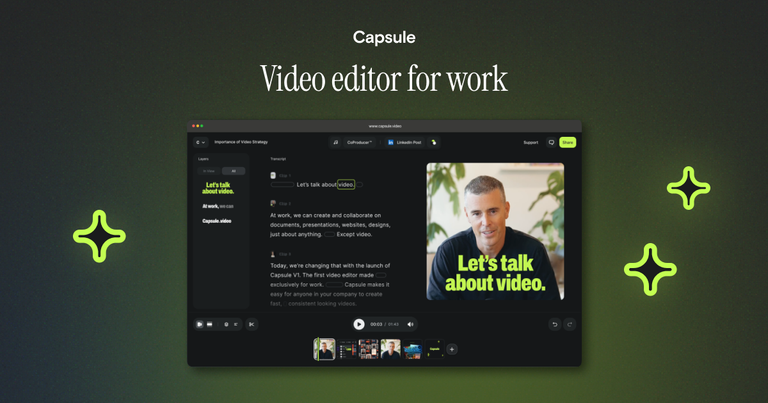
Enterprise self-serve video editing platform that enables teams to create on-brand videos at scale using templates, without requiring creative expertise.

Introduction

Capsule

Capsule is an enterprise-grade video editing platform designed to democratize video creation across organizations. The platform transforms complex After Effects files into easy-to-use templates, enabling any team member—regardless of creative expertise—to produce professional, on-brand videos.

Key Value Proposition

Capsule addresses a common enterprise challenge: while free video tools are abundant, they often lead to inconsistent branding and chaotic workflows. Capsule provides a structured system that turns self-serve video from a brand liability into a brand multiplier.

How It Works

The platform converts existing After Effects projects into reusable templates, allowing non-creative teams to scale video output without sacrificing quality or brand consistency. This approach enables organizations to leverage their existing creative assets and team structure.

Trusted by Leading Companies

Capsule is used by major tech companies including HubSpot, LinkedIn, Webflow, Instacart, ServiceNow, Carta, Samsara, Framer, and Commvault, demonstrating its enterprise-ready capabilities.

Target Audience

Enterprise marketing teams, sales teams, internal communications teams, and any non-creative professionals who need to produce on-brand video content at scale

Key Features
  • After Effects template conversion for non-creative users
  • Brand consistency enforcement across all video outputs
  • Self-serve video creation for enterprise teams
  • Template-based workflow for repeatable video content
  • Scalable video production without additional creative hires
  • Centralized system for managing video assets and templates
Use Cases
  • Internal Communications - Create consistent internal videos for company updates and training
  • Paid Media - Produce on-brand advertising and promotional videos at scale
  • Account-Based Marketing (ABM) - Create personalized video content for target accounts
  • Sales Enablement - Generate sales videos and product walkthroughs for prospects
  • Product Demos - Build standardized product demonstration videos for customers
Pros
  • Enables non-creative teams to produce professional videos
  • Maintains brand consistency across all video outputs
  • Scales video production without expanding creative teams
  • Converts existing After Effects assets into reusable templates
  • Trusted by major enterprise companies like HubSpot and LinkedIn
Cons
  • Requires existing After Effects assets for template conversion
  • Enterprise-focused pricing may not suit small businesses
  • Demo-based onboarding rather than self-service signup
Pricing

Enterprise pricing available through demo booking; no public pricing listed

FAQ

More Products

TinyPNG is Tinify’s browser-based image compressor and converter. This review explains how its web tool differs from its Developer API, what each free allowance covers, and when its compression, conversion, resizing, and cropping features may fit an image workflow.

Zamzar is an online file conversion and compression service for documents, images, video, sound, and other formats. Its free web service has daily file and upload-size limits.

iLoveIMG is a browser-based image service for compression, resizing, cropping, conversion, and editing, with a free Basic plan and paid options.

Smallpdf is an online PDF toolkit for conversion, compression, editing, merging, signing, and more. Its Free plan includes 30+ tools but limits downloads.

Convertio is a browser-based service for converting files between supported formats, with optional settings for many conversion types.

Ezgif is a free online toolset for making and editing animated GIFs, converting videos to animations, and working with other image formats.

FreeConvert is an online file converter with more than 1,500 listed conversion types and a free allowance of 20 conversion minutes per day.

HiPDF is an online PDF service with conversion, editing, compression, merging, cropping, image tools, and AI features.

123apps is a browser-based suite of video, audio, PDF, and file-conversion tools. Its apps are free to use with limits on file size and daily operations.

ChatPDF summarizes PDFs and answers questions about them. Its free plan allows two document analyses per day, with no account needed to get started.

CloudConvert is a browser-based converter for more than 200 file formats, including documents, images, audio, video, archives, and specialist formats.

OCR.space provides free browser-based OCR for images and PDFs, searchable PDF creation, and a separate API for adding text recognition to software.

Free online itinerary maker with 900+ trip plans across 96 countries. Edit day-by-day in the browser; export to PDF, Excel, CSV, Google Sheets or .ics. Free account required to download/print. Optional Pro adds premium themes; AI chat helps draft plans.

TasteDir is a curated directory of finished, well-crafted software from indie makers and small teams. Every listed tool is reviewed by hand.

An AI meeting copilot that combines live transcripts, screenshots, and project documents to deliver contextual answers, response drafts, and meeting recaps.

Create professional invoices free in your browser: live preview, any currency, tax and discounts, custom templates, and no-watermark PDF. No signup needed.