

PDF.io
What PDF.io does
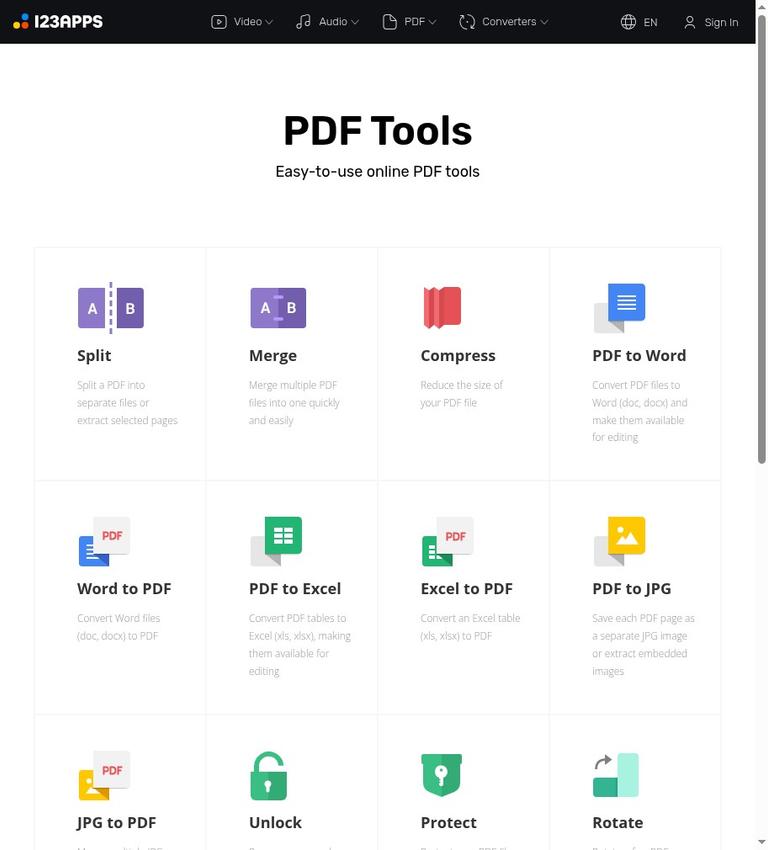
PDF.io describes itself as offering online PDF tools. Its listed tools include splitting, merging, compressing, unlocking, protecting, rotating, and adding page numbers. It also lists conversions involving Word, Excel, JPG, PNG, PowerPoint, and HTML. The official site describes available tools, but does not confirm details such as result previews, download behavior, or task-specific quality. This review is based on the official site, not hands-on testing, so it cannot confirm how a particular conversion will look or how well it will preserve formatting.
PDF.io identifies 123apps.com in its copyright notice. Its privacy policy says registration is not necessary to use the services. The site also presents sign-in and account-creation options. The existence of those options does not make an account a requirement according to the policy; the official site does not explain which account features, if any, require sign-in.
Tools and practical workflows
PDF.io lists tools for common PDF tasks. The split tool is described as separating a PDF into files or extracting selected pages. The merge tool combines multiple PDFs into one. The compression tool is described as reducing a PDF’s size. The official site does not state a specific compression amount or guarantee a particular result, so it does not confirm how much a given file will shrink.
Other listed adjustments include rotation and page numbering. The rotate tool is described as handling selected pages or changing the orientation of all pages. The site also lists a tool to add page numbers, though the official site does not explain its numbering styles or layout controls. PDF.io describes its protect tool as encrypting PDFs with a password. It describes its unlock tool as removing a password or encryption from a protected PDF. The official site does not explain results for every kind of restriction or file, so it does not confirm that every protected PDF can be unlocked.
Conversion options cover several document formats. PDF-to-Word conversion supports DOC and DOCX and is described as making files editable; Word-to-PDF conversion accepts DOC and DOCX. PDF-to-Excel supports XLS and XLSX and is described as making PDF tables editable, while Excel-to-PDF accepts XLS and XLSX. These are descriptions of intended conversions, not proof that complex layouts, tables, or formatting will convert perfectly. The official site does not confirm conversion quality for any particular document.
For image-related tasks, PDF.io says it can save each PDF page as a separate JPG or PNG, or extract images embedded in a PDF. Its JPG-to-PDF and PNG-to-PDF tools are described as combining multiple images into one PDF. PowerPoint-to-PDF conversion accepts PPT and PPTX. The PDF-to-HTML tool is described as converting without losing text or format. That wording is a product description, not an independently verified result. The official site do not confirm how a specific file will be converted.
The official site identifies online tools and says users can upload data directly or use Google Drive or Dropbox. It does not confirm whether PDF.io offers a result preview, a downloadable result, or both. It also does not confirm whether a dedicated desktop or mobile app is available, or whether there is an API. Those details remain unknown in the official information provided for this review.
Free use, limits, and Premium distinctions
PDF.io’s pricing page says all apps are free to use, subject to limits on file size and operations per day. The listed free boundary is 25 files per day and a maximum file size of 4 GB. The official site describes a usable free tier, not preview-only access or a time-limited trial. The pricing table lists 51 tools or apps, but the site does not break down which specific PDF tasks count against the daily allowance or how an operation is counted.
The pricing table also lists Premium limits and other distinctions. It gives Premium unlimited files per day and a 10 GB maximum file size, compared with 25 files per day and a 4 GB maximum for Free. It describes Free speed as “Fast” and Premium speed as “Faster,” and lists ads for Free but no ads for Premium. These are the distinctions supported by the official site. It does not confirm Premium’s price, billing terms, or any additional benefits.
For occasional work, the free limits may be sufficient if your files are within the 4 GB cap and you remain under 25 files per day. For frequent or larger-volume use, the listed daily file allowance and file-size cap are relevant points to compare with Premium or another service. The pricing page also mentions daily-operation limits, but no task-specific operation count is published. In particular, the 25-files-per-day figure is not a confirmed allowance for every individual PDF tool or a precise number of operations.
Accounts, uploads, and privacy caveats
According to the privacy policy, registration is not necessary to use the services. PDF.io nevertheless presents sign-in and account-creation options, including Google, Apple, email code, Microsoft, Yandex, and VK. The official site does not confirm which features, if any, require an account.
The privacy policy says data provided for using the services is stored on the service’s servers only as long as necessary and automatically deleted no later than 12 hours after use is completed. It also says processing is automated without human interaction or supervision, that the service does not monitor or access user-provided data, and that it does not sell, rent, or otherwise make information or data available to third parties. The policy notes exceptions to disclosure, so its statement about third parties should not be read as an unconditional promise that data can never be disclosed.
The policy says the site uses SSL encryption for additional information security. It also says cookies and third-party applications may be used for site functionality, traffic analysis, and targeted advertising, and names services including Google Analytics, Google DoubleClick, Google Adsense, Google Drive, and Dropbox. For uploads through Google Drive or Dropbox, the policy says users authorize access to view, download, and interact with data as necessary for the requested service. These are statements in the published policy, not an independent security assessment. Consider the policy details in light of your own requirements before uploading sensitive documents.
The policy gives an effective date of May 16, 2022, and says it may change without prior notification. Check the current policy if its terms are important to your decision. The official site does not confirm ownership, licensing, or commercial-use rights for original files or converted outputs. Do not infer those rights from the availability of conversion tools.
Who PDF.io may suit
PDF.io may suit someone looking for a familiar PDF operation or conversion in an online workflow, provided the free caps fit their needs. Its listed tools cover tasks such as merging, splitting, rotating, compressing, protecting, and converting files. The privacy policy’s no-registration statement may also matter to someone who does not want to create an account. However, the official site does not verify a particular conversion result, output quality, or the steps for retrieving a processed file.
It is a less certain fit when work depends on detailed controls, dependable formatting preservation, repeated high-volume operations, or clear commercial-use terms. The free limit of 25 files per day and 4 GB per file is specified, but individual tool limits are not. Premium lists higher file limits, but its price and billing details are not stated in the official site. For sensitive documents, consider the policy’s stated handling in light of your own requirements rather than treating a privacy statement as an independent security guarantee.
PDF.io describes its tools as online; the official site does not confirm a dedicated desktop or mobile app. It also does not confirm an API. If either is essential, verify availability before building a workflow around the service. Likewise, whether you can inspect results before downloading and what rights apply to converted files remain unknown from the official material published on the official site.
Alternatives to compare
If PDF.io’s limits, workflow, or unanswered questions do not fit, compare it with iLovePDF, PDF24 Tools, and LightPDF. These are existing non-paid listings that can be compared for a different workflow or tradeoff. The official site does not support a feature-by-feature comparison or a claim that any one is better. Check each service’s current tool list, free limits, privacy terms, and output details against the task you need to complete.
Verdict
PDF.io lists a broad set of online PDF tools and conversions, and its pricing page says all apps are free to use subject to limits. The stated free boundary is 25 files per day and up to 4 GB per file. That may make it worth considering for occasional document work, particularly when you need one of the listed PDF tasks. Premium lists a higher file allowance and size cap and no ads, but the official site does not confirm its price.
The main reason for caution is the absence of published details on task-specific limits, result previews and downloads, conversion quality, app availability, and file-use rights. For straightforward needs, consider the stated limits and confirm that the result works for your purpose. For sensitive, high-volume, or precision-dependent work, review the current policy and limits and compare alternatives before relying on the service.
Frequently asked questions
Is PDF.io free?
Yes. PDF.io says all apps are free to use, subject to file-size and daily-operation limits. Its pricing table lists 25 files per day and a maximum file size of 4 GB for Free. The official site describes this as a free tier, not preview-only or trial-only access.
What are PDF.io’s free limits?
The pricing page lists 25 files per day and a 4 GB maximum file size for Free. It also mentions operations-per-day limits but does not give a separate count for each PDF tool.
Do I need an account to use PDF.io?
The privacy policy says registration is not necessary. The site also offers sign-in and account creation, but the official site does not explain which account features may require registration.
What can I do with PDF.io?
Listed PDF tasks include splitting, merging, compressing, unlocking, protecting, rotating, and adding page numbers. Conversion tools include DOC/DOCX, XLS/XLSX, JPG, PNG, PPT/PPTX, and HTML-related conversions, with direction and use varying by tool.
Does PDF.io have a desktop app or API?
The official site does not confirm whether a desktop or mobile app, or an API, is available. Verify directly if either is necessary for your workflow.
How long does PDF.io keep uploaded files?
Its privacy policy says data provided for using the services is automatically deleted no later than 12 hours after use is completed. The policy also describes automated processing and other data-handling terms; review the current policy before uploading sensitive material.


