LogoAI Jet
Icon for Speakflow

Speakflow

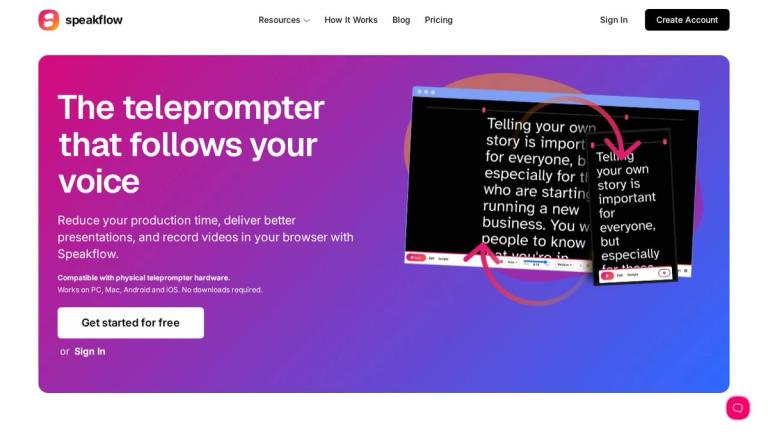
Online teleprompter that follows your voice, enabling users to reduce production time, deliver better presentations, and record videos directly in the browser.

Introduction

Speakflow — Online Teleprompter

Speakflow is a browser-based teleprompter application that revolutionizes how professionals create video content and deliver presentations. The platform's standout feature is its voice-controlled scrolling technology, which automatically follows the speaker's voice, eliminating the need for manual scrolling or a dedicated operator.

Key Highlights
  • Voice-Following Technology: The teleprompter intelligently tracks your speech and scrolls accordingly, keeping you on pace naturally.
  • Cross-Device Sync: With the "Remote" feature, users can sync their scripts across multiple devices seamlessly.
  • Team Collaboration: Write, organize, and share scripts with team members for coordinated content production.
  • Video Recording: Record and share videos directly from the browser without additional software.
  • Hardware Compatible: Works with physical teleprompter hardware for professional setups.
  • Universal Access: Compatible with PC, Mac, Android, and iOS — no downloads required.
Trusted by Industry Leaders

Speakflow is used by professionals at major organizations including Google, Apple, LinkedIn, Facebook, ESPN, Marvel, Shopify, HubSpot, Stanford, UCLA, and Logitech, demonstrating its reliability for enterprise-level content production.

Target Audience

Video content creators, corporate professionals, educators, journalists, marketers, and teams who need to produce polished video content and presentations

Key Features
  • Voice-controlled scrolling that follows your speech
  • Remote sync across devices
  • Team collaboration for script writing and sharing
  • Built-in video recording and sharing
  • Compatible with physical teleprompter hardware
  • Browser-based - no downloads required
  • Works on PC, Mac, Android, and iOS
Use Cases
  • Video content creation and production
  • Professional presentations and speeches
  • Corporate communications and training videos
  • News broadcasting and journalism
  • Educational content and lectures
  • Marketing and social media video production
  • Remote team collaboration on scripts
Pros
  • Voice-following technology eliminates manual scrolling
  • No software installation required - fully browser-based
  • Cross-platform compatibility
  • Team collaboration features
  • Trusted by major enterprises like Google, Apple, and LinkedIn
  • Free tier available to get started
Cons
  • Requires microphone access for voice-following feature
  • Internet connection required for browser-based operation
Pricing

Free tier available to get started; paid plans available (details on pricing page)

Latest News

Speakflow — Online Teleprompter

Speakflow — Online Teleprompter

8/5/2026

Keep scripts sorted, easy to find, and ready for your next recording session. Team Bring your crew Share scripts with teammates so everyone records from the same version. Product news, tips, & updates From the blog See more posts How to Write a 60-Second Video A concise guide on crafting 60-second v...

Online voice activated teleprompter | Speakflow

Online voice activated teleprompter | Speakflow

8/5/2026

Read more Bring Your Workflow to Speakflow: Midsummer 2026 Updates Midsummer updates brings cleaner collaboration tools. Read more How to Write Talking Points for Client Meetings Write a Client Meeting Outline! Read more [...] The history of the teleprompter can be traced back to the 1950s, when it ...

Speakflow | Affiliates

Speakflow | Affiliates

8/5/2026

Bring Your Workflow to Speakflow: Midsummer 2026 Updates Midsummer updates brings cleaner collaboration tools. Read more How to Write Talking Points for Client Meetings Write a Client Meeting Outline! Read more A Cleaner Recording Workflow Starts With Your Scripts Keep your scripts organized, easy t...

Speakflow API | Create scripts and automate teleprompter workflows

Speakflow API | Create scripts and automate teleprompter workflows

8/5/2026

``` { "script": { "id": "AbCdEf", "title": "My New Script", "content": "This is the script content that will appear in the teleprompter.", "preview": "This is the script content that will appear in the...", "workspace_id": "NwPqRs", "folder_id": null, "source": "api", "created_at": "2026-03-15T10:00...

What's New in Speakflow: April 2026

What's New in Speakflow: April 2026

8/5/2026

This release adds a few new pages and features, expands what free users can do, and opens Speakflow up to outside tools. Here's what changed.

FAQ

More Products

TinyPNG is Tinify’s browser-based image compressor and converter. This review explains how its web tool differs from its Developer API, what each free allowance covers, and when its compression, conversion, resizing, and cropping features may fit an image workflow.

Zamzar is an online file conversion and compression service for documents, images, video, sound, and other formats. Its free web service has daily file and upload-size limits.

iLoveIMG is a browser-based image service for compression, resizing, cropping, conversion, and editing, with a free Basic plan and paid options.

Smallpdf is an online PDF toolkit for conversion, compression, editing, merging, signing, and more. Its Free plan includes 30+ tools but limits downloads.

Convertio is a browser-based service for converting files between supported formats, with optional settings for many conversion types.

Ezgif is a free online toolset for making and editing animated GIFs, converting videos to animations, and working with other image formats.

FreeConvert is an online file converter with more than 1,500 listed conversion types and a free allowance of 20 conversion minutes per day.

HiPDF is an online PDF service with conversion, editing, compression, merging, cropping, image tools, and AI features.

123apps is a browser-based suite of video, audio, PDF, and file-conversion tools. Its apps are free to use with limits on file size and daily operations.

ChatPDF summarizes PDFs and answers questions about them. Its free plan allows two document analyses per day, with no account needed to get started.

CloudConvert is a browser-based converter for more than 200 file formats, including documents, images, audio, video, archives, and specialist formats.

OCR.space provides free browser-based OCR for images and PDFs, searchable PDF creation, and a separate API for adding text recognition to software.

Free online itinerary maker with 900+ trip plans across 96 countries. Edit day-by-day in the browser; export to PDF, Excel, CSV, Google Sheets or .ics. Free account required to download/print. Optional Pro adds premium themes; AI chat helps draft plans.

TasteDir is a curated directory of finished, well-crafted software from indie makers and small teams. Every listed tool is reviewed by hand.

An AI meeting copilot that combines live transcripts, screenshots, and project documents to deliver contextual answers, response drafts, and meeting recaps.

Create professional invoices free in your browser: live preview, any currency, tax and discounts, custom templates, and no-watermark PDF. No signup needed.