LogoAI Jet
Icon for Visla

Visla

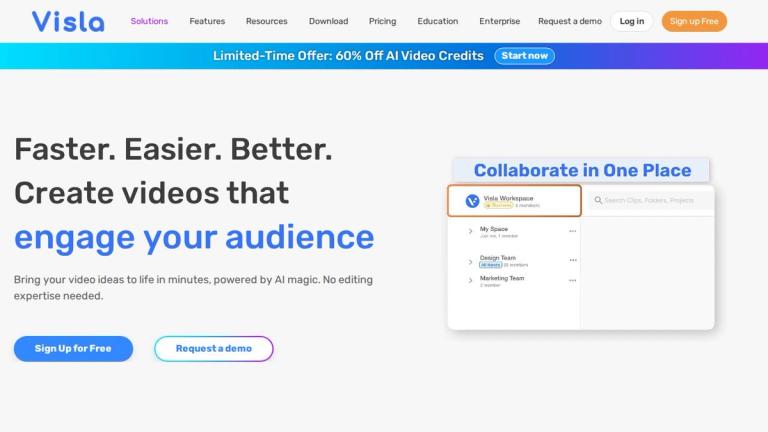
AI-powered video creation and editing platform for businesses that enables users to create professional videos in minutes without editing expertise.

Introduction

Visla - AI Video Creation Platform

Visla is an AI-powered video creation and editing platform designed specifically for business use. The platform enables users to bring their video ideas to life in minutes using AI technology, eliminating the need for traditional video editing expertise.

Key Highlights
  • AI-Powered Creation: Leverages artificial intelligence to streamline the video creation process
  • No Expertise Required: Designed for users without professional video editing skills
  • Business-Focused: Tailored for corporate and business video needs
  • Fast Production: Create professional videos in minutes rather than hours or days
  • Trusted by Millions: Used worldwide by individuals and teams to bring their stories to life
Video Styles & Templates

Visla offers a wide variety of video styles and templates including:

  • Liquid Glass UI
  • Abstract Tech 3D
  • Hyper Surrealism
  • POV Walkthrough
  • FPV Drone Tours
  • Tilt Shift Miniature
  • 3D Isometric Diorama
  • Cyber HUD
  • Motion Graphics
  • And many more specialized styles for different industries
Industry Applications

The platform supports video creation across multiple sectors including technology, healthcare, finance, real estate, legal, and more.

Target Audience

Business professionals, marketing teams, content creators, corporate communications departments, and organizations needing quick professional video production

Key Features
  • AI-powered video generation
  • No editing expertise required
  • Multiple video styles and templates
  • Fast video creation in minutes
  • Business-focused video tools
  • Team collaboration capabilities
  • Professional video output quality
  • Diverse industry templates
Use Cases
  • Business marketing videos
  • Product demonstrations
  • Corporate communications
  • Educational and training content
  • Healthcare and pharmaceutical videos
  • Financial services presentations
  • Real estate listings
  • Technology company showcases
  • Compliance training videos
  • Brand storytelling
Pros
  • No video editing experience needed
  • Fast turnaround time for video creation
  • Wide variety of professional templates
  • AI-powered automation simplifies workflow
  • Suitable for multiple business industries
  • Trusted by millions of users worldwide
Cons
  • May require subscription for full features
  • AI-generated content may need manual refinement
  • Limited customization compared to professional editing software
Pricing

Subscription-based pricing (specific tiers not detailed on homepage)

Latest News

What’s New in Visla: The Latest Product Features and Updates

What’s New in Visla: The Latest Product Features and Updates

8/5/2026

Discover what’s new in Visla. Explore all the latest product features and updates that make creating, editing, and sharing videos faster and easier. Stay up to date on every improvement to the Visla platform in one place. Get Started for Free Loading [...] Customer Videos Discord Referral Program Vi...

News Archives - The Visla Blog

News Archives - The Visla Blog

8/5/2026

in Guides, News Visla is heading to ATD 2026 in Los Angeles, and we’re excited to be part of the conversation. The 2026 ATD International Conference & EXPO, hosted by the Association for Talent Development, takes place May 17 to 20 at the Los Angeles Convention Center. You’ll be able to find Visla o...

What is Visla? A practical guide for business teams (Updated for 2026) - The Visla Blog

What is Visla? A practical guide for business teams (Updated for 2026) - The Visla Blog

8/5/2026

You can use Visla for business videos like product demos, internal training, SOP walkthroughs, onboarding clips, leadership updates, and marketing cutdowns. It supports face-to-camera recording, screen recording, meeting-based projects, and step-by-step process capture. If you want speed, the AI Vid...

AI Video Workflow Platform for Business | Visla

AI Video Workflow Platform for Business | Visla

8/5/2026

left logo right logo Sign Up for Free ## Subscribe to the Visla newsletter Stay informed about the latest product updates and feature releases! Subscribe Image Sign up for our newsletter below Thank you for subscribing Clear Icon close icon share icon Share link watch icon Watch on Visla Visla Proje...

Get involved

Get involved

8/5/2026

Connect with our community of creators, share ideas, ask questions, and get the latest updates. Join us on Discord and be a part of Visla's journey! Connect on Discord Get Involved with Visla through The Crew - Join the Ambassador Program for video creators ### Join The Crew! If you’re an advanced a...

FAQ

More Products

TinyPNG is Tinify’s browser-based image compressor and converter. This review explains how its web tool differs from its Developer API, what each free allowance covers, and when its compression, conversion, resizing, and cropping features may fit an image workflow.

Zamzar is an online file conversion and compression service for documents, images, video, sound, and other formats. Its free web service has daily file and upload-size limits.

iLoveIMG is a browser-based image service for compression, resizing, cropping, conversion, and editing, with a free Basic plan and paid options.

Smallpdf is an online PDF toolkit for conversion, compression, editing, merging, signing, and more. Its Free plan includes 30+ tools but limits downloads.

Convertio is a browser-based service for converting files between supported formats, with optional settings for many conversion types.

Ezgif is a free online toolset for making and editing animated GIFs, converting videos to animations, and working with other image formats.

FreeConvert is an online file converter with more than 1,500 listed conversion types and a free allowance of 20 conversion minutes per day.

HiPDF is an online PDF service with conversion, editing, compression, merging, cropping, image tools, and AI features.

123apps is a browser-based suite of video, audio, PDF, and file-conversion tools. Its apps are free to use with limits on file size and daily operations.

ChatPDF summarizes PDFs and answers questions about them. Its free plan allows two document analyses per day, with no account needed to get started.

CloudConvert is a browser-based converter for more than 200 file formats, including documents, images, audio, video, archives, and specialist formats.

OCR.space provides free browser-based OCR for images and PDFs, searchable PDF creation, and a separate API for adding text recognition to software.

Free online itinerary maker with 900+ trip plans across 96 countries. Edit day-by-day in the browser; export to PDF, Excel, CSV, Google Sheets or .ics. Free account required to download/print. Optional Pro adds premium themes; AI chat helps draft plans.

Free library of AI image and video prompts, each shown next to the image, GIF or video it made, with the creator credited.

TasteDir is a curated directory of finished, well-crafted software from indie makers and small teams. Every listed tool is reviewed by hand.

An AI meeting copilot that combines live transcripts, screenshots, and project documents to deliver contextual answers, response drafts, and meeting recaps.