LogoAI Jet

Introduction

Movavi offers fast and easy-to-use photo and video editing software, trusted worldwide, with a variety of programs for different needs.

Features
  • AI-Powered Auto Subtitles — One-click automatic subtitle generation that converts speech to text and creates captions in almost any language. Users can customize font, text color, and position for professional-looking captions without manual transcription.
  • AI Noise Removal — AI-driven audio denoiser that automatically removes unwanted background sounds like car noise, wind, and other audio interference, delivering crisp, professional-quality sound in your videos.
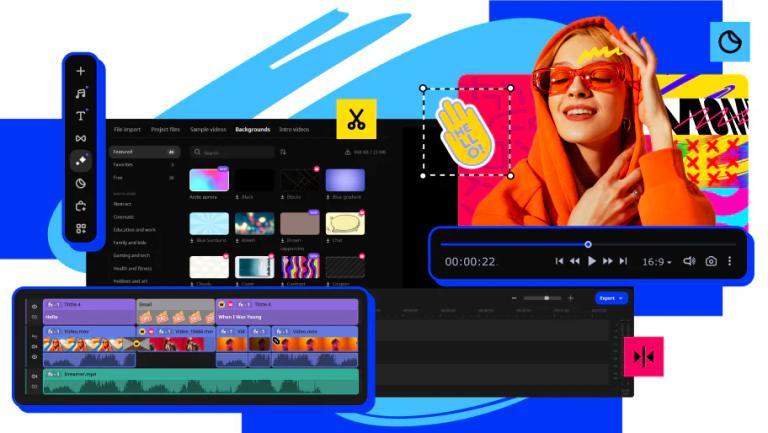
  • AI Motion Tracking — Intelligent motion tracking technology that automatically attaches photos, videos, emojis, or memes to moving objects in your footage, enhancing reality with additional graphics that follow subjects seamlessly.
  • 10,000+ Effects Library — Extensive collection of over 10,000 effects and 1,500+ music tracks including overlays, titles, LUTs, transitions, stickers, intros/outros, backgrounds, and frames for any creative project.
  • 3-in-1 Video Suite — Comprehensive Movavi Video Suite 2026 bundle combining video editor with automatic tools, fast converter supporting 180+ formats with AI upscaling up to 8X, and handy screen recorder with webcam capture.
  • Silence Removal — Automatic pause detection and removal that cuts out unwanted silences from recordings. Users can fine-tune pause length and volume threshold manually or let AI handle the cleanup automatically.
Use Cases
YouTube & Social Media Content Creation

Create engaging YouTube videos, Instagram Reels, TikToks, and YouTube Shorts with intuitive editing tools, auto-subtitles, and ready-made templates. The streamlined workflow allows creators to produce content quickly without technical complexity. Target Audience: Content creators, YouTubers, social media influencers, and vloggers looking for fast, efficient video editing without steep learning curves

Wedding & Event Video Production

Edit hybrid wedding videos and event footage with professional-grade features like color adjustment, transitions, and music integration. Combines multiple editing needs in one accessible platform for efficient post-production. Target Audience: Wedding videographers, event photographers, and amateur filmmakers creating memorable event content

Beginner Video Editing & Learning

Master video editing fundamentals with an intuitive interface, helpful tooltips, and easy-to-follow tutorials. Complete beginners can learn the software in under 20 minutes and start creating polished videos immediately. Target Audience: Complete beginners, students, educators, and anyone new to video editing who wants to learn without intimidation

Media Format Conversion & Screen Recording

Convert media files across 180+ formats with lightning-fast processing and AI upscaling up to 8X. Record screens, webcam footage, and system audio for tutorials, presentations, and documentation. Target Audience: Business professionals, educators, trainers, and anyone needing reliable format conversion and screen capture tools

Pros
  • Exceptionally beginner-friendly interface that can be mastered in under 20 minutes, with intuitive tooltips and easy-to-follow design that removes technical barriers for new users
  • Powerful AI-powered features including auto-subtitles, noise removal, motion tracking, and silence removal that significantly speed up the editing workflow and automate tedious tasks
  • Massive effects library with 10,000+ effects and 1,500+ music tracks providing extensive creative options for any project style or mood
  • Comprehensive 3-in-1 suite combining video editor, converter, and screen recorder in one package, offering excellent value for diverse multimedia needs
  • Trusted by over 70 million users across 190+ countries with regular updates (15+ per year), demonstrating strong reliability and continuous improvement
Cons
  • Free version has significant limitations including watermarks, 60-second video/half audio length restrictions, and locked advanced features requiring purchase for full functionality
  • Positioned as beginner-to-intermediate software; may lack advanced professional features that high-end cinematic editors require for complex productions
  • 7-day trial period may be insufficient for users to fully evaluate all features before committing to a purchase
  • Primarily designed for simplicity which means some professional editors may find the interface oversimplified compared to industry-standard tools like Adobe Premiere or DaVinci Resolve

Latest News

Movavi Video Editor | What's New

Movavi Video Editor | What's New

8/5/2026

Check out our latest updates! To start using them in your videos, make sure you're running the latest version of Movavi Video Editor. Not sure which version you have? Head over to Help → About to check.

What’s New in Movavi Video Suite

What’s New in Movavi Video Suite

8/5/2026

The track is highlighted when titles or audio are being added, so you can easily find the track · Sleep mode is disabled during audio recording. It will no longer interrupt the process ... Yet another improved version of our preview window has seen the light! First things first: it’s redesigned · Mo...

What's new in Movavi Video Converter

What's new in Movavi Video Converter

8/5/2026

An important technical update is here! You can get Movavi Video Converter 24 for free, if you have an activated version 23: Visit www.movavi.com and download the latest version. Install it on your computer. Enter your previous activation key to continue using the full version of the program. If you ...

What's new in Movavi Screen Recorder

What's new in Movavi Screen Recorder

8/5/2026

An important technical update is here! You can get Movavi Screen Recorder 24 for free, if you have an activated version 23: 1. Visit www.movavi.com and download the latest version. ... 3. Enter your previous activation key to continue using the full version of the program. If you have an older versi...

Upgrade Programs

Upgrade Programs

8/5/2026

You’ll also get all major updates at no extra cost. Just download and install the new version by entering your email address on this page. If you have a lifetime license, you’ll need to purchase the new version to get the benefit any of our updates. See all the latest Movavi programs and special pri...

Alternatives

  • Wondershare Filmora

    Offers an intuitive interface and a wide range of effects, making it a popular choice for beginners and intermediate video editors.

  • DaVinci Resolve

    Provides professional-grade video editing, color correction, visual effects, and audio post-production all in one powerful, free package.

  • Adobe Premiere Pro

    An industry-standard professional video editing software known for its comprehensive features and integration with other Adobe Creative Cloud apps.

  • CyberLink PowerDirector

    Delivers a fast and feature-rich video editing experience with advanced tools and effects suitable for various skill levels.

  • Vegas Pro

    Known for its flexible timeline and powerful audio editing capabilities, catering to both professional and advanced amateur video editors.

  • CapCut

    A highly popular and free video editing app, especially for mobile and social media content creation, offering user-friendly tools and trendy effects.

  • Kdenlive

    An open-source and free video editor that provides robust features for non-linear video editing across multiple platforms.

  • Shotcut

    Offers a free, open-source, and cross-platform video editor with a simple interface and support for a wide range of formats.

  • Corel VideoStudio

    Provides a fun and easy-to-use video editing experience with creative features, templates, and effects for all skill levels.

  • Adobe Photoshop Elements

    A user-friendly photo editing software that offers guided edits and automated features for enhancing and organizing images, similar to Movavi's photo tools.

FAQ

User Reviews

4.6/5.0
(11reviews)
Click stars to rate

Pricing

Pricing Model: Freemium

Movavi Video Suite (Free Trial)

A 3-in-1 bundle for every video task – video editor with automatic tools, fast converter, and handy screen recorder.

Free
Not applicable

Movavi Video Suite (Full Version)

The complete 3-in-1 bundle for every video task without limitations.

Refer to product page
Not specified on this page

Movavi Video Editor (Free Version/Trial)

Your simple yet powerful editor for creating wow videos.

Free
Not applicable

Movavi Video Editor (Full Version - Lifetime License)

The full version of Movavi Video Editor without restrictions.

Refer to product page
One-time

Movavi Video Editor (Full Version - Annual Subscription)

The full version of Movavi Video Editor with an annual subscription.

Refer to product page
Yearly

Movavi Photo Editor (Free Trial)

Your smart and simple photo editor for creating wow pictures.

Free
Not applicable

Movavi Photo Editor (Full Version)

The full version of Movavi Photo Editor without limitations.

Refer to product page
Not specified on this page

Movavi Video Converter (Free Trial)

Your go-to converter for changing media formats in seconds.

Free
Not applicable

Movavi Video Converter (Full Version)

The full version of Movavi Video Converter without limitations.

Refer to product page
Not specified on this page

Movavi Screen Recorder (Free Trial)

Your hassle-free screen capture tool for more efficient projects.

Free
Not applicable

Movavi Screen Recorder (Full Version)

The full version of Movavi Screen Recorder without limitations.

Refer to product page
Not specified on this page

Movavi Unlimited

All Movavi programs and effects in one pack for creating stunning content.

Not specified on this page (advertised as '80% Off')
Not specified on this page

More Products

TinyPNG is Tinify’s browser-based image compressor and converter. This review explains how its web tool differs from its Developer API, what each free allowance covers, and when its compression, conversion, resizing, and cropping features may fit an image workflow.

Zamzar is an online file conversion and compression service for documents, images, video, sound, and other formats. Its free web service has daily file and upload-size limits.

iLoveIMG is a browser-based image service for compression, resizing, cropping, conversion, and editing, with a free Basic plan and paid options.

Pixelcut is an AI image and video platform with tools for background removal, upscaling, retouching, image generation, and product visuals.

Slazzer removes image backgrounds online. Its website offers free, low-resolution previews; higher-resolution downloads use credits.

Smallpdf is an online PDF toolkit for conversion, compression, editing, merging, signing, and more. Its Free plan includes 30+ tools but limits downloads.

Convertio is a browser-based service for converting files between supported formats, with optional settings for many conversion types.

Ezgif is a free online toolset for making and editing animated GIFs, converting videos to animations, and working with other image formats.

FreeConvert is an online file converter with more than 1,500 listed conversion types and a free allowance of 20 conversion minutes per day.

HiPDF is an online PDF service with conversion, editing, compression, merging, cropping, image tools, and AI features.

123apps is a browser-based suite of video, audio, PDF, and file-conversion tools. Its apps are free to use with limits on file size and daily operations.

ChatPDF summarizes PDFs and answers questions about them. Its free plan allows two document analyses per day, with no account needed to get started.

CloudConvert is a browser-based converter for more than 200 file formats, including documents, images, audio, video, archives, and specialist formats.

OCR.space provides free browser-based OCR for images and PDFs, searchable PDF creation, and a separate API for adding text recognition to software.

Free online itinerary maker with 900+ trip plans across 96 countries. Edit day-by-day in the browser; export to PDF, Excel, CSV, Google Sheets or .ics. Free account required to download/print. Optional Pro adds premium themes; AI chat helps draft plans.

Free face rater with visible symmetry and proportion diagrams, plus optional illustrated reports and six AI hairstyle concepts.