

WordCounter.net
What WordCounter.net does
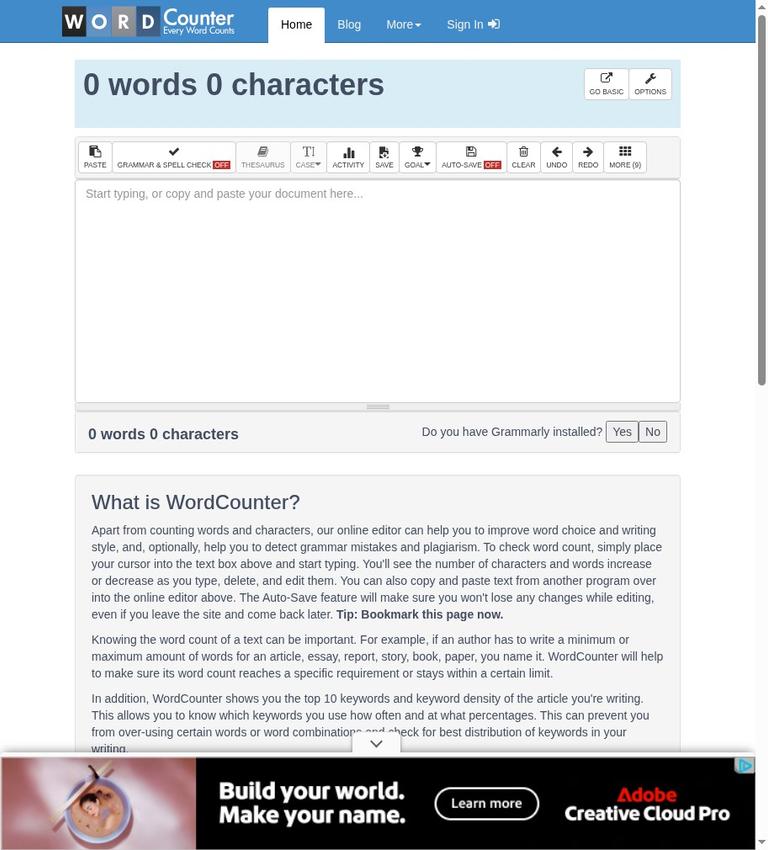
WordCounter.net describes itself as an online editor and text-analysis service. Its central job is to count words and characters: type into the editor or paste text from another program, then see those counts change as you edit. The site also presents writing statistics, keyword information, text-cleaning options, and controls related to writing goals. That makes it more than a bare counting box, although the official site supports describing it as an online writing utility—not as a full document-production platform.
The distinction matters when comparing the named service WordCounter.net with generic word-counter tools. The site combines live counts with other editor and analysis controls. Whether those extra controls are useful depends on the task: you might need a quick count, an overview of sentence patterns, or a way to record writing activity. The Terms identify the service as an online information and text-analysis service operated by Roth Media GmbH.
The core workflow described on the homepage is direct: place the cursor in the text box and type, or copy and paste text from another program. Word and character counts change as you type, delete, and edit. The official site does not confirm a requirement to sign in for this basic counting workflow. It does associate signing in with Auto Save and writing goals, so those account-linked features should be distinguished from the described live count.
Counting and text statistics
For a short assignment, email, article, or other piece of text, the described workflow is to open the site, enter or paste a draft, and read the changing word and character totals. The homepage says the numbers increase or decrease as text is edited. It also presents a Details overview with several other statistics. The available evidence describes this browser workflow but does not confirm performance across particular browsers or devices.
Listed Details fields include unique words, characters with and without spaces, sentences, longest and shortest sentence lengths, average sentence length, average word length, paragraphs, pages, syllables, lines, and “Words (Publisher).” The site describes reading level as an indicator of the education level a person would need to understand the words used. It also presents average reading and speaking time. These are displayed indicators and estimates, not definitive judgments about readability or how long an individual reader will take.
For drafts where repeated terms matter, WordCounter says it displays the top 10 keywords and their density. That can help surface frequently used terms for your own review. The output alone does not confirm whether a term is appropriate or whether a draft is optimized; it should not determine wording without consideration of meaning and context.
Flow Score uses sentence-length highlighting to help visualize writing rhythm and variety. Sentence length can be one editing signal, but highlighting does not confirm that a passage flows well. Read the text for meaning and clarity rather than treating a visual pattern as a verdict.
Editor tools and goals
The site lists additional editor controls, including a thesaurus, case controls, activity, save, proofread, talk-to-type, goal, and speed controls. Its thesaurus instructions say to select a word in the document to get a list of synonyms. The official site identifies these controls but does not explain the behavior or limits of every tool, so their labels should not be taken as a guarantee of a particular result.
WordCounter also lists text-cleaning options for removing email word wrapping, invalid characters from Microsoft Word documents, and multiple new lines. These options may be relevant when text has been pasted from another source. The official site does not specify every kind of formatting or text the cleaning tools handle.
An activity feature lets users record word and character counts, add notes, and edit or delete records. The site describes goals using measures such as words, characters, sentences, paragraphs, pages, reading time, speaking time, and publisher words, with minimum or maximum targets. A separate control describes building a goal progress bar for a website, blog, or signature. These features concern tracking or displaying progress, rather than merely reading the live count.
Signing in is associated with Auto Save and writing goals. The site says Auto Save can save work automatically and store multiple versions for access if a browser crashes or is accidentally closed. The privacy policy separately says documents explicitly saved by signed-in users are stored in their account. The official site does not specify retention periods for saved account documents.
Free access, pricing, and limits
The verified free boundary covers a usable core word-count workflow: the homepage tells visitors to place the cursor in the text box and start typing to check word count. It also advertises creation of a free WordCounter account. The official site does not confirm a WordCounter subscription, paid plan, price, or a feature boundary between free and paid WordCounter use. Do not infer that every listed feature is free, that a paid upgrade exists, or that a particular control requires payment.
The homepage separately mentions a seven-day Grammarly Pro offer connected to a free WordCounter account, with unlimited checks for plagiarism and writing issues described in the offer. That does not confirm a WordCounter paid plan. The official site also does not confirm the terms after the seven-day period or the exact provider and data handling for the referenced tools. Do not treat the offer as proof of permanent free access to those checks.
No numeric maximum input size, word-count limit, upload-size limit, or usage quota is stated in the official site. If your work depends on processing a very long document or a batch of files, confirm that the service handles your task rather than assuming a limit or unlimited capacity.
The upload panel lists PDF, TXT, DOC, DOCX, and ODT formats. The editor lists downloads as PDF or TXT, while a sharing interface lists image and PDF downloads. The official site does not explain how uploaded files are converted, how formatting is handled, whether all formats behave alike, or whether downloads require sign-in or payment. It also does not confirm that those outputs are restricted to a preview. Treat the listed formats as available controls, not a promise about the result for a particular document.
Privacy and reliability
Privacy deserves attention before you enter text. WordCounter’s privacy policy says users may not use the free service for texts containing personal data of any kind. The Terms say text submitted to free tools is not permanently stored unless the user is logged in and explicitly chooses to save it. The privacy FAQ says text entered while signed out is stored in the user’s browser storage and is not accessible to WordCounter on its servers; it also says that text is temporary and cannot be recovered after closing the tab or clearing browser data.
Those statements should be read alongside other language in the privacy policy. It says that text users want checked is transferred to the operator’s servers to perform the check. It also lists the most recent text entered into the Word Counter form and describes a cookie that can store recent text and modifications for return visits, while warning that their continued presence is not guaranteed. The published statements describe different aspects of text handling; they do not support a simple assurance that text never leaves the user’s device. Follow the stated restriction on personal data, and avoid entering confidential or sensitive material unless you have reviewed the current policy and decided the handling is appropriate.
The Terms say automated word-counting and grammar-checking algorithms do not guarantee accuracy and may miss errors. They also say text-processing features are provided without warranty and that suggestions or corrections may not be accurate, complete, or appropriate for the user’s purpose. For a strict submission count, compare the result against the destination’s counting rules. For proofreading, review suggestions yourself; the site’s tools are not a substitute for checking important text.
Reliability is another limitation stated by the service. Its privacy policy says the free service has no guarantee of uptime, quality, or reliability, and the Terms do not guarantee uninterrupted, error-free operation. The Terms also say users must be at least 16 years old. These points matter if you are considering the service for work that depends on guaranteed availability or for users below that stated age.
The Terms warn that third-party tools and advertisements may lead to services outside the operator’s control and subject to separate terms and privacy practices. The privacy policy also says advertising companies may use cookies based on visits to WordCounter or other websites. Consider those disclosures when using linked or advertised services.
Platforms and outputs
The homepage refers to a free app or browser extension for additional writing corrections. The official site does not confirm its distribution, operating systems, exact feature scope, or availability. It likewise does not confirm a standalone desktop application or public API. If you need a specific installation or integration, confirm its availability rather than assuming it is supported.
The site lists document uploads and several download controls, but important operational details remain unknown: how uploads are converted, how formatting is handled, and whether a particular output requires sign-in or payment. The official site does not confirm whether saved documents can be exported in formats other than those shown in the editor controls. If a particular file workflow is essential, verify it before relying on it.
Who should consider WordCounter.net?
WordCounter.net may suit someone who wants a free browser-based count and may also find text statistics, keyword counts, sentence-length highlighting, cleanup options, or goal tracking useful. The clearest supported use is entering or pasting text and watching the word and character counts update. A free account is advertised, and signing in is associated with Auto Save and writing goals; consider the stated storage details before saving work.
It is a weaker fit for personal-data-containing text, guaranteed uptime, or work that depends on validated proofreading. Its privacy policy prohibits using the free service for text containing personal data, while its Terms disclaim accuracy and uninterrupted-operation guarantees. It may also be a poor fit if your workflow depends on a documented paid support tier, specific upload-conversion behavior, fixed file limits, or a confirmed desktop application: the official site does not confirm those details.
For another writing workflow, you can compare QuillBot. It is an alternative listing to consider, not evidence that it provides a specific feature or performs better. Choose according to the task, and check each service’s current terms and privacy information before entering text.
Verdict
WordCounter.net offers a usable free core word-counting workflow, surrounded by text statistics and editor controls. The live count is the clearest reason to use it; keyword density, sentence-length highlighting, cleanup options, and goals may be useful when they fit your process. The principal cautions are also clear: the privacy policy bars personal data in the free service, accuracy and uptime are not guaranteed, and the official site leaves pricing, file handling, and several platform details unresolved.
Use it for ordinary text when a quick count and supplementary statistics are enough. Treat its analysis and proofreading controls as aids, not authority. If your text contains personal data or is confidential, do not use the free service for it; if a strict external count matters, check the destination’s rules. WordCounter.net is most useful when you keep those boundaries in view.
Frequently asked questions
Is WordCounter.net free?
The homepage supports free use of the core counter by instructing visitors to type in the text box to check word count. It also advertises a free WordCounter account. The official site does not confirm a WordCounter paid plan or pricing. A separate seven-day Grammarly Pro offer is mentioned, but it does not confirm WordCounter pricing or permanent free access to those checks.
Do you need an account to count words?
The homepage instructs visitors to type in the editor to check word count, and the official site does not confirm an account requirement for that core workflow. Signing in is associated with Auto Save and writing goals.
What does WordCounter.net measure?
It counts words and characters as text is edited. Its Details overview lists fields such as unique words, sentences, paragraphs, syllables, lines, and average sentence and word measures. It also shows the top 10 keywords and keyword density, along with indicators or estimates including reading level and reading or speaking time.
Can you use WordCounter.net for personal information?
No. The privacy policy says users may not use the free service for texts containing personal data of any kind. The policy also describes text transfer to servers for checking and browser storage for signed-out use. Follow the stated restriction and review the current policy before entering other sensitive material.
Does WordCounter.net guarantee accurate counts or proofreading?
No. The Terms say automated word-counting and grammar-checking algorithms do not guarantee accuracy and may miss errors. Check important counts against the destination’s rules and review suggested corrections yourself.
Can you upload documents and download results?
The upload panel lists PDF, TXT, DOC, DOCX, and ODT. The editor lists PDF and TXT downloads, while the sharing interface lists image and PDF downloads. The official site does not explain conversion behavior or formatting, or establish whether a particular download requires sign-in or payment.
Is there a WordCounter.net desktop app or API?
The homepage refers to a free app or browser extension, but the official site does not confirm its availability details or exact features. It does not confirm a standalone desktop application or public API.


