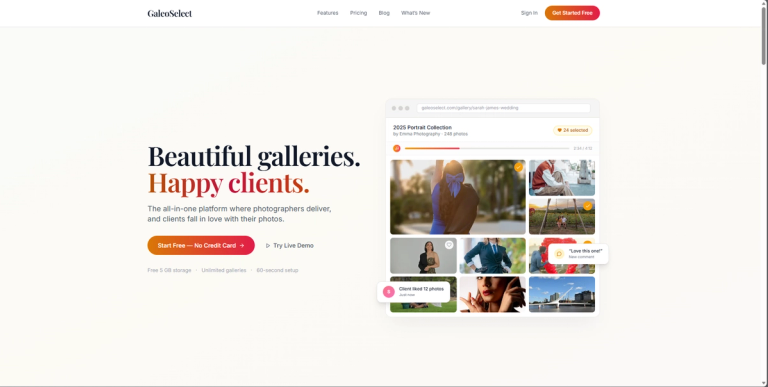
Gallery sharing and portfolio platform for photographers
Features
- Beautiful Client Galleries — Create stunning, magazine-style galleries with customizable themes (Moody & Cinematic, Light & Airy, Classic) that showcase photos and videos in a professional, immersive viewing experience.
- Client Selection & Feedback Tools — Clients can easily tap to select favorites, leave comments, and approve photos directly within the gallery—eliminating confusing email chains and 'photo 47' requests.
- Built-in Portfolio Page — A personal portfolio URL (e.g., galeoselect.com/your-name) with curated gallery covers and a contact form, allowing photographers to share one link with potential clients without needing a separate website.
- Full Brand Customization — Add custom logos, colors, layouts, and password protection to every gallery, ensuring each delivery feels like a seamless extension of the photographer's studio brand.
- Multi-Media Support — Upload and deliver photos, videos, and audio files in one place—allowing photographers to create richer experiences like wedding galleries with first-dance songs.
- Real-Time Analytics — See which photos get the most engagement, when clients view galleries, and what resonates—providing actionable insights rather than vanity metrics.
Use Cases
Wedding Photo Delivery & Proofing
Wedding photographers upload hundreds of photos and a highlight video, add the couple's first-dance song, and share a branded gallery link. The couple selects their album favorites, leaves comments on special moments, and approves final edits—all in one place. Target Audience: Wedding photographers and studios
Portrait Session Client Proofing
Portrait photographers deliver session images in a clean, password-protected gallery. Parents or clients tap to select their preferred shots for printing or digital download, streamlining the selection process that traditionally required back-and-forth emails. Target Audience: Portrait, family, and senior photographers
Creative Portfolio Showcase
A photographer uses their GaleoSelect portfolio page as a living resume, curating their best work into themed galleries. They share the single link with potential clients, agencies, or on social media, complete with a built-in contact form for inquiries. Target Audience: Freelance and creative photographers seeking new clients
Collaborative Commercial Shoots
For commercial or branding shoots, the photographer shares a gallery with multiple stakeholders (client, art director, marketing team). Each can comment and select preferred images, centralizing feedback that would otherwise scatter across emails and messages. Target Audience: Commercial, product, and branding photographers
Pros
- Generous free tier with 5 GB storage, unlimited galleries, and all features included—no credit card required to start.
- Dramatically improves client experience with intuitive selection tools, comments, and music integration, leading to higher satisfaction and rebooking rates.
- Eliminates the need for a separate portfolio website with a built-in, customizable portfolio page and contact form.
- Fast setup (60-second claim) with drag-and-drop uploads for hundreds of high-res photos, videos, and audio.
- Strong branding capabilities with custom logos, colors, layouts, and password protection across all plans.
Cons
- Free plan storage is limited to 5 GB (~1,000 photos), which may be restrictive for high-volume photographers or those shooting video.
- Advanced features like custom domains or white-labeling are not mentioned, potentially limiting for studios wanting a fully branded experience.
- Relies on client internet access and comfort with digital platforms—may be less suitable for clients who prefer physical proofs or have limited tech skills.
- Pricing for the Pro plan ($10/month for 20 GB) is competitive but still a recurring cost, and storage needs could grow quickly with video content.