

CyberChef review: a practical guide to its browser-based toolkit
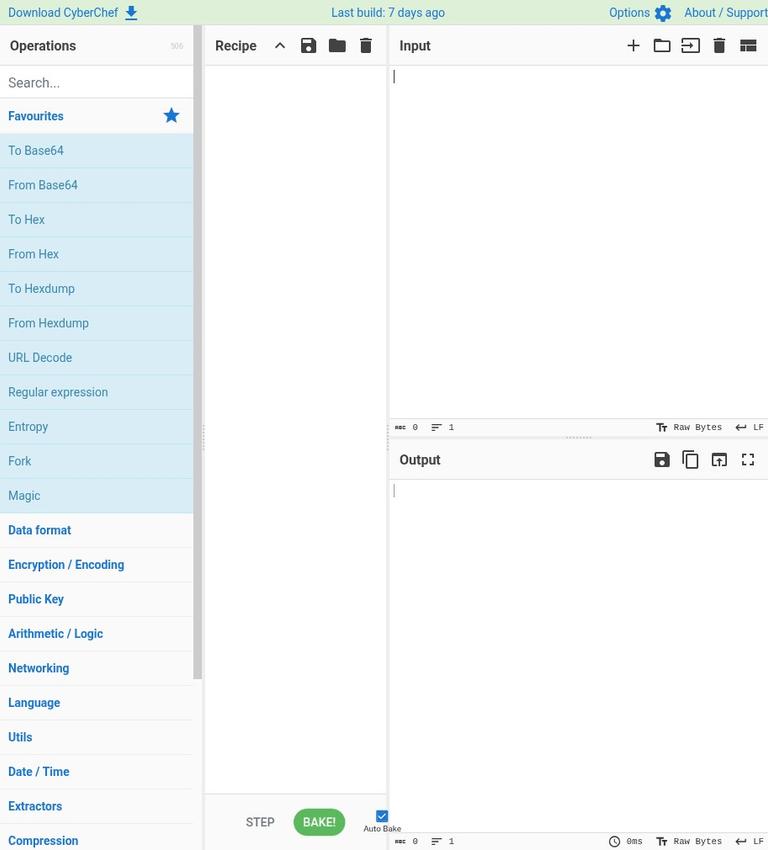
CyberChef is a free, open-source tool from GCHQ for transforming data in a browser. It brings hundreds of operations into one workspace, including encoding and decoding, hashing, compression, and date conversion. You can combine operations into a recipe, provide input, and inspect the result. That makes CyberChef useful for repeatable data conversions and investigations where you want to understand each step rather than rely on a single-purpose converter.
The main appeal is breadth without a paid plan, account, or credit quota. The main consideration is that CyberChef is a toolbox, not a promise that every operation is secure, private, or suitable for production security work. Standard processing is client-side, but some operations may involve external resources, and recipe-sharing URLs can contain data. For sensitive material, use a downloaded copy offline and take care not to share URLs that encode your input.
What CyberChef is
CyberChef is a browser-based data transformation application maintained by GCHQ and released under the Apache 2.0 license. Rather than focus on one type of file or task, it offers a large collection of operations that can be arranged in sequence. A recipe might decode text, convert it, and then show the result; the value is in being able to inspect and adjust those steps.
The app is not limited to artificial intelligence, and it should not be described as an AI assistant. Its Magic operation can suggest ways to decode data, but much of CyberChef is straightforward, rule-based processing. You choose operations, supply input, and review what those operations produce. That distinction matters: CyberChef does not automatically establish what data means or whether an output is trustworthy.
You can use the hosted app or download a standalone ZIP from the app or GitHub releases and open it locally. CyberChef does not require an account for its standard use, and there is no paid tier or credit quota. Those features make it approachable for occasional conversions as well as for users building a library of repeatable recipes.
Key features and useful workflows
A broad operation library
CyberChef includes hundreds of operations. Examples in the core toolkit include Base64, hexadecimal, and URL encoding and decoding; hashes; compression; and date conversion. These cover common jobs such as turning encoded text into a readable form, converting a value between representations, or changing date data into another format.
The range is useful when a task involves several transformations. Instead of moving between separate websites or applications, you can arrange operations together and see how each step changes the input. That can make a complicated conversion easier to inspect and repeat. It also means you should choose operations deliberately: an incorrect operation or order can produce output that looks confusing without being meaningful.
Recipes and Magic
A recipe is a sequence of operations. Drag operations into the recipe, set any available options, and arrange them in the order you want. When the input changes, CyberChef can update the output automatically, or you can choose to bake the recipe manually. The output panel gives you a place to inspect the result before saving a recipe or downloading output.
Magic is designed to suggest possible decoding approaches. Treat suggestions as leads to examine, not as proof that the suggested interpretation is correct. A useful habit is to compare a suggested operation with what you know about the source and to inspect intermediate results. If a recipe produces a surprising result, remove or change one step at a time instead of assuming the final output is valid.
Fork for multiple inputs
Fork can split multiple inputs so that a recipe can process them individually. This is useful when you have a collection of values that need the same sequence of operations. It can save repetitive manual work, but it does not remove the need to check the results. Confirm how your inputs are separated and review a sample of outputs, especially when the data has inconsistent formatting.
How to use CyberChef step by step
- Choose where to run it. Open the hosted app for a routine task. For restricted data, download the standalone ZIP and open that copy locally, with the network disconnected when your requirements call for offline handling.
- Prepare a small input. Start with a representative sample rather than a large file. Remove sensitive content if you are still figuring out which operations and settings to use.
- Add an operation. Find the transformation you need and drag it into the recipe area. For example, select a suitable decoding operation if your input is known to be encoded. Do not assume that every string that looks unusual uses Base64 or hex.
- Set the sequence. Add further operations only when the task calls for them. The order matters: decoding before a later transformation can produce a different result from applying those steps in reverse.
- Enter input and bake. Provide the text or file, then inspect the output. Depending on the app settings, output can update automatically or wait for you to bake the recipe manually.
- Check intermediate steps. If the result is not what you expected, inspect the recipe and test one change at a time. For uncertain data, Magic may suggest decoding possibilities, but you still need to judge whether a suggestion fits the source.
- Save or download as needed. Save a recipe if you expect to reuse the sequence. Download output when the result is too large to display conveniently or when you need a file for another workflow.
This approach works well for learning a transformation because the recipe makes the sequence visible. For repeat work, keep a clear record of the input format and intended result alongside the recipe. A saved sequence can reproduce the same operations, but it cannot ensure that future input is well-formed or that the resulting data is appropriate for its destination.
Pricing and free access
CyberChef is free to use. It is distributed under the Apache 2.0 license, and it requires no account, subscription, or credit balance. There is no subscription period, paid usage bundle, or per-operation charge to budget for. You can use the hosted app or download the standalone ZIP for local use.
That makes the pricing unusually simple: there is no paid upgrade to unlock more operations or remove a stated credit limit. The practical constraints are instead related to the browser, the size of the input and output, and the suitability of a given workflow. If you are choosing a tool for a team, consider whether a browser application and locally managed recipes fit your handling and review requirements; the absence of a subscription does not itself establish organizational approval.
Real limits to plan around
CyberChef can handle files around 2 GB in some circumstances, depending on the browser, but that is not a guaranteed capacity. Large inputs may be limited by the browser or the device, so test with a non-sensitive sample before planning a large conversion. Do not treat the approximate file size as a service-level promise.
Output display has a separate practical limit. When output exceeds the default 1 MiB display size, it becomes downloadable instead of appearing fully in the output panel. This changes how the result is displayed, not whether you can access the complete output. Download and inspect the resulting file with an appropriate tool if you need to work with the full result.
Another limit is conceptual. Encoding is not encryption: Base64, hexadecimal, and URL encoding change representation but do not provide confidentiality. Hashes are not reversible, so a hash operation is not a way to decode an original value. CyberChef’s cryptographic functions should not replace vetted production security implementations. Use a security-reviewed approach for systems where cryptographic correctness, key management, or compliance requirements matter.
Finally, a recipe only does what its operations specify. Check the input format, timestamp convention, and output after each transformation, especially when a recipe changes or discards information. Review the operation choices and output against the task, especially before using results in a production process.
Privacy and data handling
Under standard processing, CyberChef handles input and recipes in the client-side browser rather than sending them to a server. For users who need stronger separation, the standalone ZIP can be opened locally. An offline copy is the more cautious choice for restricted data because some operations may involve external resources; do not assume every possible workflow remains entirely offline just because the app is client-side.
Pay particular attention to share URLs. Recipes and inputs may be encoded in a URL so that a workflow can be shared, which is convenient for harmless examples but risky for secrets. Never send confidential input in a CyberChef URL or share a link without checking what it contains. If a recipe needs to be shared, build it using sample or sanitized data instead.
A sensible workflow is to identify the sensitivity of the input first, use a downloaded copy offline when required, and test the recipe on non-sensitive data before processing the real material. These practices reduce avoidable exposure, but they do not turn CyberChef into an approved system for every organization or data type. Follow your own security and data-handling rules.
Who CyberChef is a good fit for
CyberChef suits people who regularly need to inspect or transform data using familiar operations. Analysts, developers, technical support staff, and curious learners can benefit from being able to chain conversions and review the result in one workspace. The ability to save a recipe is useful when a sequence needs to be repeated, while Fork can help with multiple inputs that share a format.
It is also a good fit for users who prefer a free tool without an account or usage credits. The standalone ZIP is useful for an approved offline environment, with recipes kept locally and external-resource operations avoided.
Who should look elsewhere
CyberChef is a poor fit if you want a guided, nontechnical explanation of what data means rather than a set of operations to configure. Magic can suggest decoding approaches, but users still need to assess whether an output makes sense. It is also not the right choice for treating encoded data as protected data, recovering a value from a one-way hash, or substituting general-purpose operations for vetted production cryptography.
A separate tool may be preferable when the job is narrowly focused. For example, OpenSSL or jq may be more suitable within command-line workflows, while Epoch Converter is a name to consider for timestamp-focused needs. Choose based on the task, the format you work with, and your privacy requirements rather than assuming that a larger operation library is always the better fit.
Alternatives to consider
For a broad set of browser-based transformations, CyberChef’s advantage is its recipe-based approach and range of operations. If you already work in a command line, jq can fit structured-data workflows and OpenSSL can fit cryptographic command-line tasks. Those are not direct substitutes for every CyberChef operation, and they require their own understanding of commands, inputs, and security practices.
For a narrower need, Epoch Converter is a possible timestamp-focused alternative. A dedicated tool can be simpler when you only need one kind of conversion, while CyberChef is more useful when you want to combine several transformations. Match the tool to the data and workflow, and check that any alternative meets your handling requirements before using sensitive information.
FAQ
Is CyberChef free?
Yes. CyberChef is free and open source under the Apache 2.0 license, with no paid tier or credit quota.
Does CyberChef require an account?
No account is required for standard use.
Does CyberChef send input to a server?
Standard processing is client-side, but some operations may involve external resources. Use a downloaded copy offline for restricted data.
Can I share a CyberChef recipe safely?
Recipes and inputs may be encoded in share URLs. Never put secret data in a URL; share recipes with sample or sanitized input instead.
What is CyberChef’s file size limit?
Files around 2 GB may be possible depending on the browser, but that size is not guaranteed.
Can CyberChef encrypt data or reverse hashes?
CyberChef includes encryption and decryption operations, but encoding such as Base64 is not encryption. Cryptographic hashes are one-way and cannot simply be decoded back to the original input.
Sources
Source date: November 11, 2026.


