

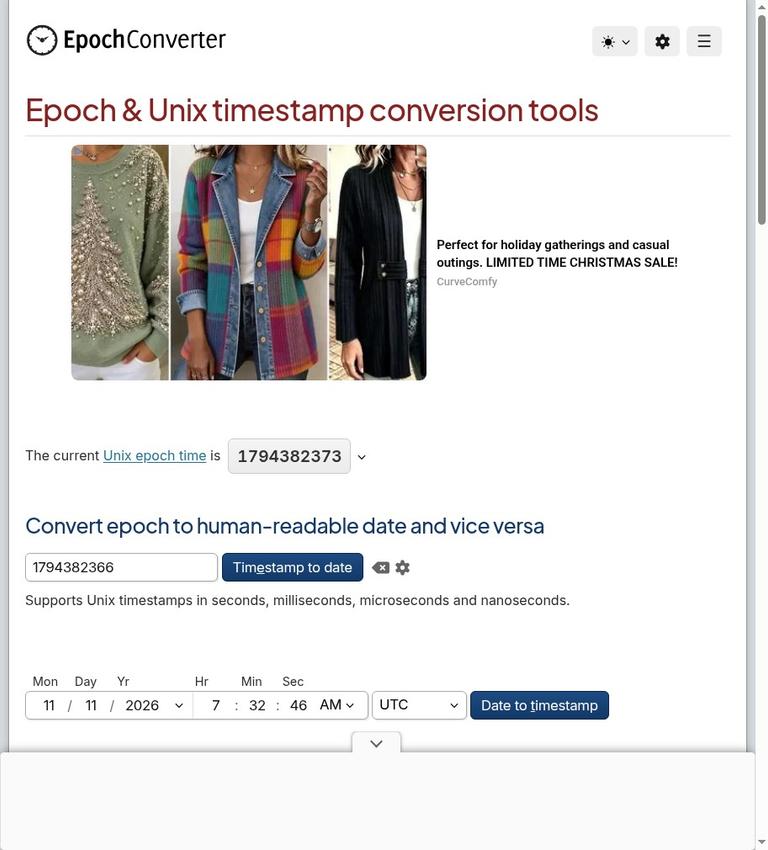
EpochConverter review
EpochConverter.com is a free web utility for converting Unix timestamps into human-readable dates and converting dates into Unix timestamps. It handles timestamps expressed in seconds, milliseconds, microseconds, and nanoseconds, and its date parser accepts many common formats, including ISO 8601 and RFC 3339. The site also links to tools for working with batches of timestamps and offers language-reference snippets.
This is a practical converter, not an AI assistant or a general-purpose date and time system. Its central job is to make a numeric timestamp understandable or turn a date into a numeric timestamp. That can help when reading an application log, checking an API value, preparing test data, or debugging a date conversion. The result is useful only when the input unit and intended time zone are clear. A number with the wrong unit can produce a date far from the one you intended, while a local-time interpretation can differ from UTC.
The service is free to use on the web, requires no account, and has no paid plan or conversion quota. Its conversion runs in JavaScript using the date and time settings of the computer running the browser. That makes the tool convenient for quick checks, but it also means your computer’s clock and time-zone context matter. The site does not make a blanket promise that its whole website has no tracking or fixed data-retention practices, so avoid pasting an entire sensitive log when a timestamp alone will do.
What EpochConverter is for
Unix time counts seconds from 1970-01-01 00:00:00 UTC, while ignoring leap seconds. This origin is known as the Unix epoch. EpochConverter lets you move between that numeric representation and a calendar date. The zero value corresponds exactly to the epoch origin.
A timestamp is not self-explanatory. It may be stored as seconds, milliseconds, microseconds, or nanoseconds. Contemporary values commonly use 10 digits for seconds, 13 for milliseconds, 16 for microseconds, or 19 for nanoseconds. These digit counts are useful clues, not a substitute for checking the source system’s documentation. A number can have an unexpected length, and digit count alone does not establish its unit.
The converter is most useful when you already have a date or timestamp and need a straightforward translation. It is not a replacement for understanding how the software that produced the value represents time, whether the value is UTC, or how that software handles date boundaries. Those details determine whether a conversion answers the right question.
Key features
Four timestamp units
EpochConverter supports seconds, milliseconds, microseconds, and nanoseconds. The distinction matters because milliseconds are 1,000 times as large as seconds, and microseconds and nanoseconds use still smaller units of time. If a millisecond value is interpreted as seconds, the output will be wrong by a factor of 1,000. Check the expected unit before drawing conclusions from the resulting date.
Date parsing and epoch conversion
The service converts a human-readable date to an epoch value and converts epoch values to human-readable dates. Its parser accepts many formats, including ISO 8601 and RFC 3339. Those formats can include time-zone information, which is important: an explicitly marked UTC time and a time entered without a zone should not be treated as interchangeable without checking the intended interpretation.
UTC and browser-local output
The output can be viewed in UTC or in the browser’s local time. UTC provides a stable reference for comparing values across locations. Local time can be more familiar when checking a date against a computer’s calendar, but it depends on the browser’s computer settings. When sharing a result, state which time zone you mean rather than copying a clock reading without context.
Date-range helpers and related tools
EpochConverter includes helpers for the start and end of a day, month, and year, and links to batch tools. These features can save time when preparing ranges or working with multiple values. For database or API range queries, a next-day-exclusive end is often easier to reason about than trying to represent the final instant of a day. For example, the conceptual interval from the start of one day up to, but not including, the start of the next day avoids assumptions about timestamp precision.
Language-reference snippets
The site provides language-reference snippets. These can serve as a starting point when implementing timestamp handling in code, but the correct library call and unit still depend on the programming language and the application’s requirements. Treat a snippet as a reference for the conversion idea, not as a guarantee that it matches every project’s date-time conventions.
How to use EpochConverter
- Identify what you have. Decide whether the input is a numeric Unix timestamp or a human-readable date. If it came from a service, log, database, or API, check its documentation for the unit and time-zone convention.
- Check the timestamp scale. Contemporary values often have 10 digits for seconds, 13 for milliseconds, 16 for microseconds, or 19 for nanoseconds. Use those patterns as a quick check and confirm the unit wherever possible.
- Enter the value or date. Use EpochConverter’s relevant conversion direction: timestamp to human-readable date, or date to timestamp. For date text, choose a format the parser can read, such as ISO 8601 or RFC 3339.
- Choose the time-zone view that answers your question. Compare in UTC when you need a consistent reference across systems. Use browser-local output when you specifically want the date and time as shown in the computer’s local setting.
- Check the result against the context. Confirm the calendar date, clock time, and unit. If a result is hours off, investigate time-zone interpretation and daylight-saving rules before assuming the timestamp itself is corrupt.
- Use a range helper when appropriate. For a day, month, or year boundary, use the corresponding helper. When building a range query, consider an inclusive start and an exclusive next-period start rather than guessing the last representable instant.
- Keep shared data minimal. For a quick conversion, paste only the timestamp or date needed. Do not include a full log, user record, or unrelated sensitive information when the single value is sufficient.
Free access and pricing
Epoch Converter costs $0 to use, with no account, subscription, or conversion credits to manage. You can check timestamps and readable dates directly in the browser. The site also links to batch conversion tools and reference examples for common programming environments.
For a quick investigation, free access makes it easy to compare a timestamp with a known event. For a recurring production workflow, use a repeatable conversion inside your own application or approved reporting tools. A convenient web lookup complements that workflow rather than replacing its time-zone configuration and tests.
Real limits to keep in mind
Time-zone interpretation
UTC and browser-local time can show different clock readings for the same instant. A local calendar date can also differ from the UTC calendar date near midnight. If a timestamp is used in a report, support ticket, or database investigation, include the time zone alongside the displayed date and time.
Daylight-saving transitions
Some browsers apply present-day daylight-saving rules to historical dates. That can affect how a historical local time is displayed or interpreted. If a date falls near a daylight-saving change, verify the intended historical zone rules with a suitable authoritative time-zone source. Do not assume that a fixed UTC offset describes a location for every date.
A calendar day is not always 86,400 elapsed seconds in a local time zone. Daylight-saving changes can make the elapsed interval between local calendar boundaries different from that number. For dependable date-range work, define the calendar zone and boundaries explicitly instead of adding 86,400 seconds to represent “tomorrow” in every situation.
The 2038 issue is not a universal site cutoff
A signed 32-bit Unix timestamp representation overflows on January 19, 2038. That is a limitation associated with particular storage or software representations, not a universal limit on Unix timestamps or a stated EpochConverter website cutoff. If a system stores timestamps in a signed 32-bit field, check that system’s behavior for dates near and beyond the limit.
Parsing is not the same as knowing intent
A parser can read a date string without knowing what its author intended. Ambiguous dates, missing time zones, and unit mismatches need context from the originating system. Prefer an unambiguous date format with an explicit zone when exchanging values between systems.
Privacy and data handling
The site's conversion tools use JavaScript and your computer's date and time settings. You need only the numeric timestamp or date to perform a conversion; a full server log is unnecessary.
Copy just the value you are investigating rather than a line containing customer names, account identifiers, internal hostnames, or tokens. Treat a timestamp converter as a date utility, not a place to store incident records. For restricted work, use a local date utility or your organization's approved reporting environment. This also keeps a reproducible conversion close to the system that generated the timestamp.
Who should use it—and who should not
EpochConverter is a good fit for developers, analysts, support staff, and technically curious users who need to translate a timestamp or date quickly. It is also useful for checking whether a value is probably in seconds or milliseconds and for looking up the epoch representation of a date. Its no-account, no-cost access suits one-off checks without a procurement decision.
It is a weaker fit when you need a complete time-zone database workflow, a formal audit trail, controlled storage for incident records, or a system-specific diagnosis of how an application stores dates. It cannot infer whether an undocumented number is seconds or milliseconds with certainty, nor can a basic conversion resolve ambiguous intent in a date string. In those cases, consult the originating system’s documentation or a time-zone-aware library in the application itself.
Alternatives
For a quick date calculation or time-zone comparison, timeanddate.com is a plain-name alternative. Operating-system date utilities can be useful when you want to work locally rather than enter a value on a website; the exact commands and behavior depend on the operating system. CyberChef is another name to consider for users who already use a broader data-transformation tool. These alternatives are not identical products, so compare their supported formats and time-zone behavior against the task at hand.
Bottom line
EpochConverter is a focused, free Unix timestamp converter with four supported units, common date parsing, UTC and browser-local output, date-boundary helpers, batch-tool links, and language references. Its strongest practical advantage is uncomplicated access: no account, no price, and no conversion quota. Use it with the correct unit and time zone, be careful around daylight-saving transitions and historical dates, and submit only the information needed for the conversion.
FAQ
Is EpochConverter free?
Yes. Web conversions cost $0, require no account, and have no conversion credit quota or paid plan.
Which timestamp units does EpochConverter support?
It supports seconds, milliseconds, microseconds, and nanoseconds.
What does Unix timestamp zero mean?
It represents 1970-01-01 00:00:00 UTC, the Unix epoch origin.
Why can UTC and local output show different times?
UTC is a fixed reference; local output uses the browser computer’s time settings and may reflect daylight-saving rules.
Does EpochConverter require an account?
No. The web converter does not require an account.
Is a calendar day always 86,400 seconds?
No. Daylight-saving transitions can make the elapsed time between local calendar boundaries differ from 86,400 seconds.


