

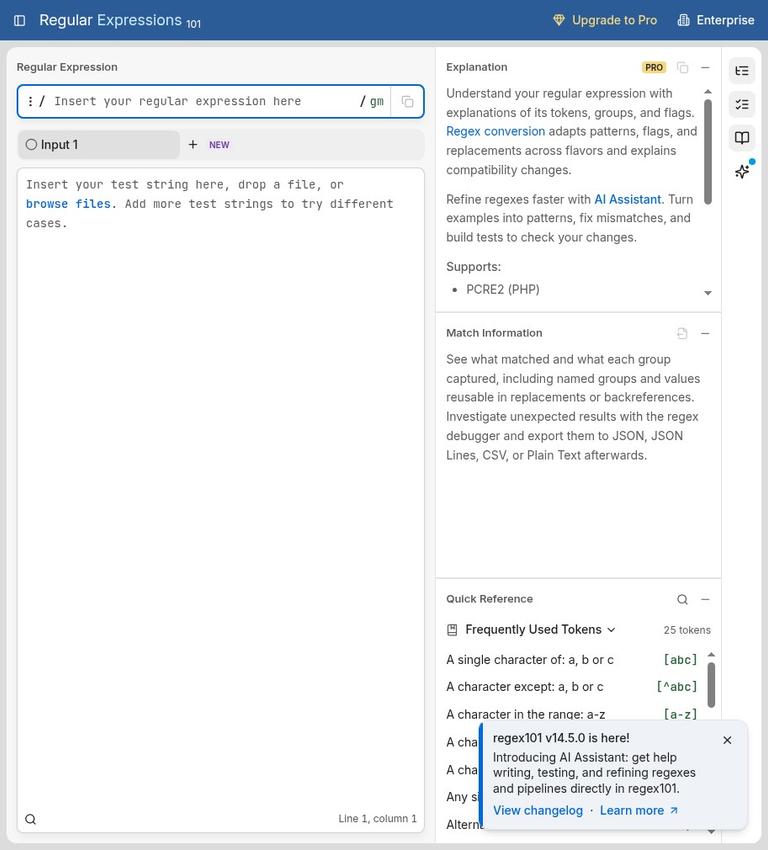
What regex101 is
regex101 is a browser-based workspace for writing and checking regular expressions. A regular expression, often shortened to regex, describes a pattern for finding or replacing text. The site combines a pattern editor with a test-text area and tools for examining matches, explaining pattern tokens, debugging, substitutions, and unit tests. It is a practical place to explore how a pattern behaves before using it in an application or script.
The tool is not itself a general-purpose AI writing product. Its core features are direct regex editing and testing; the Pro plan adds an AI Assistant. That distinction matters: you can use regex101’s principal matching and explanation tools without asking an AI to create a pattern, and you can decide whether an AI-assisted workflow suits the task and the data involved.
The site lists support for PCRE2, JavaScript, Python, Go, Java, .NET, Rust, POSIX BRE, POSIX ERE, and legacy PCRE. Regex syntax varies among these flavors. Selecting the language or engine relevant to your destination is therefore more useful than testing against a default and assuming the result will transfer unchanged. The same-looking pattern can behave differently across implementations, so treat the selected flavor as part of the test, not a cosmetic setting.
Key features and what they are good for
Live matching and token explanations
The central workflow is to enter a pattern and sample text, then inspect what matches. This makes regex101 useful for small, focused questions: does a pattern find every digit sequence, does an anchor restrict a match to a whole line, or does an alternative match either of two words? The pattern [0-9]+, for example, describes one or more characters from zero through nine. The pattern ^cat$ matches the word cat when it is the entire tested line, while cat|dog offers two alternatives.
Token explanations make the pattern easier to inspect by describing its components. This is especially helpful when a pattern has several character classes, quantifiers, groups, or anchors. Rather than treating a regex as an opaque string, break it into parts and confirm that each part expresses the intended rule. An explanation can clarify syntax, but it does not replace checking the result against representative text.
Debugger and test cases
The debugger provides a way to follow how a regex engine processes a match. On the free plan, the debugger is a 50-event PCRE2 preview. That is a specific limit: it is not a promise of an unlimited trace, and the listed free debugger preview is for PCRE2. Pro adds longer debugger traces.
Unit tests let you organize expected behavior around a pattern. They are useful when a change that fixes one example might accidentally break another. Keep both positive cases, which should match, and negative cases, which should not. The free plan includes unit tests, though its test-text and pipeline capacities are limited. Pro adds unit-test exports, which can help when you want to take test material into another workflow.
Substitution and text pipelines
Regex101 also supports substitutions, so you can examine how matched text would be replaced. A replacement should be tested on examples that include both ordinary and awkward cases: repeated separators, empty-looking values, punctuation, and strings that should remain untouched. The free plan includes two test strings and two text pipeline layers. Those caps make it best suited to compact exercises rather than a large collection of input files or a deep processing chain.
Multiple flavors and conversion
The flavor selector is one of the tool’s most important practical features. Choose the target flavor before debugging, then keep it consistent with the environment where the regex will run. The homepage lists the engines and language flavors above. Free users can convert a pattern to JavaScript; Pro includes conversion to all targets. Conversion can be a useful starting point when moving between environments, but check the resulting expression in its destination context rather than assuming a conversion eliminates every compatibility concern.
Pro also adds benchmarks and regex formatting. A benchmark can support comparison work, while formatting can make a long expression easier to read. These features are most useful when a pattern is becoming difficult to maintain or when you need to compare approaches. They do not remove the need to define what counts as a correct match.
How to use regex101 step by step
-
Start with the real target. Identify where the regex will eventually run: for example, JavaScript, Python, or another listed flavor. Select the corresponding flavor in regex101 before writing the pattern. If you are exploring rather than implementing, still choose a flavor deliberately so the result has a clear context.
-
Describe the rule in ordinary language. Write down what should match and what should not. “Find one or more digits” is more precise than “find a number,” which could mean an integer, a decimal, or a signed value. Decide whether punctuation, spaces, line boundaries, or surrounding text matter.
-
Build a small pattern. Begin with the simplest expression that represents the rule. For example, [0-9]+ is a compact way to match one or more digits. Add complexity only when a test case shows that the current pattern is insufficient. This makes it easier to spot which change affected the result.
-
Enter representative test text. Include a normal example, a boundary case, and at least one example that should not match. For a digit pattern, that could mean text with digits, text without digits, and a mixed string where only a portion should match. Use synthetic or redacted material rather than confidential records.
-
Inspect the match and explanation. Check exactly what is highlighted, not merely whether the page reports a match. Read the token explanation to confirm the pattern’s pieces mean what you intended. If the result is too broad or too narrow, revise one element and check the same examples again.
-
Debug when the behavior is unclear. Use the debugger to understand the engine’s path through a pattern. Remember that the free debugger is a 50-event PCRE2 preview. For a complex expression, reduce it to a smaller pattern or smaller test string before trying to reason about every part at once.
-
Test alternatives and replacement behavior. If the task involves replacing text, try the substitution against examples that should change and examples that should remain as they are. If several patterns might work, compare them with the same test set instead of judging from one convenient sample.
-
Save or export only as needed. Basic editing does not require an account. An account is useful for saved workspaces. Pro includes unit-test exports and broader conversion features. Before saving or sharing a workspace, review its access mode and the text it contains.
-
Check in the destination environment. Treat regex101 as a useful testing workspace, not a substitute for a final check where the expression will actually run. Confirm the target flavor and test the expression with realistic, non-sensitive cases in the application or codebase that will use it.
Free and paid pricing
The free plan covers matching, unit tests, Intellisense, two test strings, and two text pipeline layers. Its debugger is a 50-event PCRE2 preview, and free conversion is available to JavaScript. These limits are concrete: if you need more than two test strings or two pipeline layers in the same workflow, the free plan may not fit that work without simplifying it.
Pro adds the AI Assistant, longer debugger traces, benchmarks, regex formatting, multiple files, unit-test exports, and conversion to all targets. ToolFindings reports the Pro price as EUR 4.99 per month when billed yearly, for EUR 59.88 per year. Confirm the current price and billing terms at checkout. Eligible accounts can receive a seven-day trial, according to regex101’s release notes; eligibility applies, so do not assume every account will see the same offer.
The paid plan makes the most sense when its added capabilities address a recurring constraint: needing multiple files, longer traces, exports, or broader conversions. If you only need to test a short expression, inspect matches, and use the free limits, the basic plan already covers that use. An AI Assistant is an optional Pro addition, not a requirement for building or checking a regex.
Limits to keep in mind
The free plan’s two test strings and two pipeline layers set the clearest boundaries for larger workflows. The 50-event debugger preview is another practical limit, and it applies to the free PCRE2 debugger. Free conversion is limited to JavaScript, while conversion to all listed targets is a Pro feature. If these restrictions matter, decide whether the task can be reduced to a smaller representative test or whether the paid features are worth the cost.
Regex compatibility also has limits that no interface can make disappear. Different engines and programming languages may support different syntax or interpret details differently. A pattern that works in one selected flavor should not be treated as automatically portable. Confirm the destination flavor, inspect conversions, and test the final expression where it will be used.
Finally, a test set is only as useful as its examples. A pattern can appear correct on one short sample and still fail on an unusual input. Add cases for boundaries, missing values, repeated separators, or other conditions relevant to the task. For high-impact data processing, combine regex checks with code review and tests appropriate to the application.
Privacy and data handling
Use synthetic or redacted test strings when developing patterns for customer data, credentials, or internal documents. Saved workspaces offer Public, Locked, and Private access modes; choose the mode before saving and inspect the example text before sharing. A public example should contain only information you intend other people to read.
Basic editing, saved sharing, file loading, and Pro's AI Assistant are different workflows. Keep secrets out of shared workspaces and AI prompts. For a task that must remain entirely within an approved local environment, use your IDE's regex search and a project test suite rather than pasting production records into a public web tool.
Who should use it, and who should look elsewhere
regex101 is a good fit for developers, analysts, students, and technical writers who want to build or inspect regular expressions in a browser. It is particularly useful for learning syntax, comparing behavior across listed flavors, checking substitutions, and assembling focused unit tests. The explanation and debugging tools can help make a complicated expression more understandable, while the free plan is enough for modest, short-form testing.
It is a weaker fit for work that depends on processing large sets of sensitive data in a browser, exceeds the free plan’s text and pipeline limits, or requires a workflow centered on local project files. In those situations, use a local IDE or application’s search and test tools, or choose Pro if its multiple-file and debugging features address the need. Even with Pro, keep the target runtime and privacy rules in view.
The product is also not necessary for every text task. If the goal is a single simple search, the search function in an editor may be enough. If the task is to learn regex syntax, regex101’s explanation and test features provide a more focused workspace. For production use, the useful distinction is between experimenting in a tester and validating the final pattern in its real environment.
Alternatives
RegExr is another browser-based option for exploring regular expressions. Compare the interfaces and supported behavior against the flavor you need, then validate the selected pattern in its destination environment. For a workflow tied closely to a code project, local IDE search is a straightforward alternative: it keeps the test close to the code and avoids switching to a separate browser workspace. These alternatives are not necessarily feature-for-feature replacements; choose according to whether you value a dedicated online tester or an integrated local workflow.
FAQ
Is regex101 free?
Yes. The free plan includes matching, unit tests, Intellisense, two test strings, two text pipeline layers, a 50-event PCRE2 debugger preview, and conversion to JavaScript.
Does regex101 require an account?
No account is needed for basic editing. An account is useful for saved workspaces.
Which regex flavors does regex101 support?
It lists PCRE2, JavaScript, Python, Go, Java, .NET, Rust, POSIX BRE, POSIX ERE, and legacy PCRE.
How much does regex101 Pro cost?
ToolFindings reports EUR 4.99 per month billed yearly, or EUR 59.88 per year. Confirm the current price at checkout.
What does regex101 Pro add?
Pro adds an AI Assistant, longer debugger traces, benchmarks, formatting, multiple files, unit-test exports, and conversion to all targets.
Is it safe to test private text in regex101?
Use synthetic or redacted text. Sharing, saved workspaces, uploads, and AI features can have different privacy implications; workspace modes are Public, Locked, and Private.
Sources
Pricing and product details checked against these sources on November 11, 2026.


